Itsypad icon
Itsypad icon

Itsypad

Lightweight Mac scratchpad and clipboard manager featuring multi-tab editing, 1,000-item clipboard, syntax highlighting for 185+ languages, local privacy-focused storage, global hotkeys, split view, clickable links, iCloud sync, auto-save, and minimal resource usage.
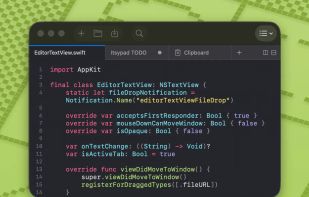
Itsypad screenshot 1

Cost / License

  • Free
  • Open Source (MIT)

Application type

Platforms

  • Mac
8likes
1comment
0articles

Features

Properties

  1.  Privacy focused
  2.  Support for Themes
  3.  Lightweight
  4.  No AI

Features

  1.  Works Offline
  2.  No Tracking
  3.  Support for MarkDown
  4.  Dark Mode
  5.  No registration required
  6.  Syntax Highlighting
  7.  Ad-free
  8.  Tabbed interface
  9.  Global hotkey
  10.  Markdown preview
  11.  On top
  12.  Sits in the MenuBar
  13.  Sync with iCloud
  14.  Support for Keyboard Shortcuts
  15.  Support for Hotkeys
  16.  Auto-saving
  17.  Checklists
  18.  Search and Replace

Itsypad News & Activities

Highlights All activities

Recent News

No news, maybe you know any news worth sharing?
Share a News Tip

Recent activities

  • Lerromark icon
    LongJhonson added Itsypad as alternative to Lerromark
  • Smolpad icon
    Maoholguin added Itsypad as alternative to Smolpad
  • Benchpad icon
    portmd3 added Itsypad as alternative to Benchpad
  • sanies liked Itsypad
  • dedtxt icon
    chrisportka added Itsypad as alternative to dedtxt
  • iJustFocus Scraps icon
    ijustfocus added Itsypad as alternative to iJustFocus Scraps
  • Wierzciu liked Itsypad
  • StoreProof icon
    roqd added Itsypad as alternative to StoreProof
  • Wisp for macOS icon
    POX added Itsypad as alternative to Wisp for macOS
  • BrendonMarsh reviewed Itsypad  

    Great! This is exactly what I was looking for a simple text editor for my Mac, similar to the Notepad app on Windows, which I had really gotten used to back in the day due to its simplicity and convenience. It features a great design, and tabs are included.

Itsypad information

  • Developed by

    PT flagNick Ustinov
  • Licensing

    Open Source (MIT) and Free product.
  • Written in

  • Alternatives

    25 alternatives listed
  • Supported Languages

    • English
    • Spanish
    • French
    • German
    • Russian
    • Japanese
    • Chinese
    • Korean
    • Portuguese
    • Italian
    • Polish

AlternativeTo Category

Office & Productivity

GitHub repository

  •  415 Stars
  •  14 Forks
  •  16 Open Issues
  •   Updated  
View on GitHub

Popular alternatives

View all

Our users have written 1 comments and reviews about Itsypad, and it has gotten 8 likes

Itsypad was added to AlternativeTo by Paul on and this page was last updated .

Comments and Reviews

   
Top Positive Comment
BrendonMarsh
0

Great! This is exactly what I was looking for a simple text editor for my Mac, similar to the Notepad app on Windows, which I had really gotten used to back in the day due to its simplicity and convenience. It features a great design, and tabs are included.

What is Itsypad?

Itsypad is a compact, efficient scratchpad and clipboard manager for Mac users. It features a text editor with syntax highlighting, multi-tab functionality, split view, and find and replace features. It also supports clickable links, lists, and checklists. The clipboard manager can store up to 1,000 items and offers easy navigation and search features. Users can also use global hotkeys to control the application.

Itsypad is designed to be lightweight, using minimal CPU and memory resources. It prioritizes privacy, with no AI or telemetry, ensuring user data stays on the user's machine. It can be displayed or hidden as per user preference and offers an auto-start feature. Users can sync their scratch tabs across different Macs via iCloud.

The editor supports multi-tab and split view for working on multiple files simultaneously. It offers syntax highlighting for over 185 languages, automatic language detection, and a built-in find bar. All tabs, content, and cursor positions are saved across restarts, and content is auto-saved to the session. URLs in plain text and markdown tabs are clickable. The software also includes a Monokai-inspired theme with dark and light variants.

Official Links