

Jot for Mac icon
Jot for Mac icon

Jot for Mac

 Like

A local-first notes inbox for your Mac. One keystroke, and it lands as plain markdown in a folder you own.
Jot for Mac screenshot 1

Cost / License

  • Pay once
  • Proprietary

Application type

Since

  • New

Platforms

  • Mac
0likes
0articles
Save

Features

Properties

Features

Highlights All activities

Jot for Mac News & Activities

Recent activities

Jot for Mac information

AlternativeTo Category

Audio & Music

Popular alternatives

View all
Jot for Mac was added to AlternativeTo by Paul on and this page was last updated .

No comments or reviews, maybe you want to be first?

Official Links

What is Jot for Mac?

A local-first notes inbox for your Mac. One keystroke, and it lands as plain markdown in a folder you own.

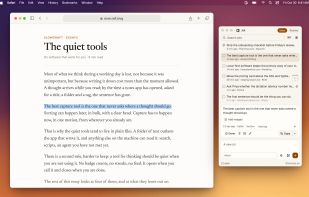
One keystroke takes what you're reading and keeps it as a plain file on your Mac. No account. No sync. Nothing to renew.

  1. One keystroke: shift shift takes the selection. Text, an image in it, or a screenshot already on the clipboard.
  2. A folder you own: every jot is plain markdown on this mac. No account, no sync. Analytics stay off unless you turn them on.
  3. Pay once: a license for 1, 3, or 10 macs. Updates included. Nothing renews.

Everything lands in one quiet inbox.

  • The inbox: shift shift captures the selection. Text, images in it, or a screenshot already on the clipboard.
  • Hold FN: speak, and the text pastes into the app in front. Keep dictations on, and a copy is a jot. Cleanup is optional. Fillers and false starts come out. The wording stays. One switch turns cleanup off. ⌃⌥V speaks a jot. Hold to talk.
  • ⌃ ⌥ A: grab a region of the screen. Mark it up, then copy it to paste anywhere, or save it to the inbox. ⌃⌥D draws a page and saves it as a jot.
  • ⌃ ⌥ N: quick note writes one without opening the window. ⌃⌥N.
  • On this mac, or a cloud model: transcription and cleanup are separate choices. On this mac: parakeet, apple speech (macOS 26+), apple intelligence (Apple Silicon, macOS 26+), Ollama, or LM Studio. In the cloud: your own key for OpenAI, anthropic, Gemini, Groq, Mistral, OpenRouter, and more, or Vercel AI gateway. Keys stay in the macOS keychain. Every model shows its price and speed.
  • Send to your agent: right-click a jot. Send it to your agent. Claude Code, Codex, Cursor, and T3 Code open a new chat with the jot in the message box. Nothing is sent until you press send. ⌘⇧S sends to the app you used last.

A folder you own. Every jot is a plain markdown file.

No account. No sync. Analytics are opt-in. Cards show the markdown formatted, and the file stays plain text, so agents and other tools can read it. Drop an image onto a jot. Merge selected jots from the command palette.