


Meteorite
2 likes
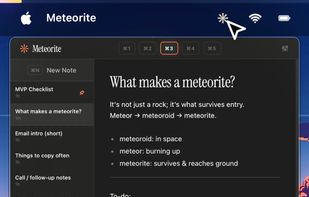
Ultra-minimal Mac menu bar note tool for fast, keyboard-only capture of thoughts, reminders, and snippets, with Markdown formatting, quick search, local privacy, light resource use, and direct export, ensuring notes are instantly accessible and private.

Cost / License
- Freemium (Pay once)
- Proprietary
Application type
Platforms
- Mac


Features
Highlights All activities
Meteorite News & Activities
Recent News
No news, maybe you know any news worth sharing?
Share a News Tip
Recent activities
 Paul added Meteorite as alternative to Hold My Notes and Noty - Sticky Notes
This menu note app os the best, better than 5 Note. Pro version provides 5 pages layout, Apple Notes sync all for a low one time payment.
 Paul added Meteorite as alternative to Wisp for macOS
- Ben liked Meteorite
- Flaskshade updated Meteorite


Developed by
 Flaskshade
 Licensing
Proprietary and Freemium product.Pricing
One time purchase (perpetual license) ranging between $8 and $13 + free version with limited functionality.Alternatives
32 alternatives listedBadge
Get an embeddable badge for MeteoriteSupported Languages


Comments and Reviews
This menu note app os the best, better than 5 Note. Pro version provides 5 pages layout, Apple Notes sync all for a low one time payment.