
Hold My Notes
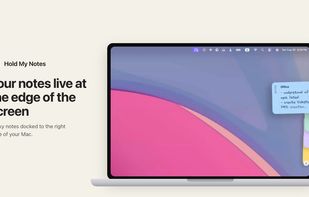
Hold My Notes keeps a deck of sticky notes on the right edge of your Mac. At rest it is a thin pill; move the pointer over and the notes fan out. Encrypted on your machine, no account, macOS 13 or later.
Features
Properties
- Privacy focused
- Customizable
- Minimalistic
Features
- No Tracking
- Cloud Sync
- Works Offline
- Ad-free
- No registration required
- Full-Text Search
- AES-256 Encryption
- Support for MarkDown
- Sticky Notes
- Encrypted Notes
- Integrated Search
- Screen Edge Docking
- Sidebar
- Support for Keyboard Shortcuts
- Sync with iCloud
Hold My Notes News & Activities
Recent activities
POX added Hold My Notes as alternative to Noty - Sticky Notes- POX added Hold My Notes as alternative to Notefox, Tomboy, Stickies and Notezilla
- POX added Hold My Notes
Hold My Notes information
What is Hold My Notes?
Your notes live at the edge of the screen. Sticky notes docked to the right edge of your Mac. Reach over and they fan out.
Three states, one movement The deck reacts to where the pointer is. Nothing is clicked until you want to write.
Step 01: At rest, a thin stripe
The deck sleeps as a 12 pt pill on the screen edge, one coloured dash per note. No window, no Dock icon, and nothing running in the background. The right edge of a Mac desktop: a narrow vertical pill holding four coloured dashes, one per note.
Step 02: Reach over, and it fans
The notes shingle down the edge, 45 ms apart, each showing its label. Every one keeps its colour and its own vertical tab. Four notes shingled down the right edge of the screen, each showing a vertical label: Office, Groceries, Hold, Side-projects, with a plus button below them.
Step 03: Open one where it sits
The note slides clear of the deck at full size, far enough to read every line. Type and it writes itself to disk 250 ms after you stop. One note expanded out of the deck, showing the title Groceries and a handwritten list: apple, 4x banana, dry fruits, peanuts.


