iJustFocus Scraps icon

iJustFocus Scraps

iJustFocus Scraps is a fast, minimal scratchpad built for capturing small notes, ideas, and code snippets without friction. It opens instantly, stays out of your way, and saves everything locally on your device — a clean space to write without accounts, cloud services, or...
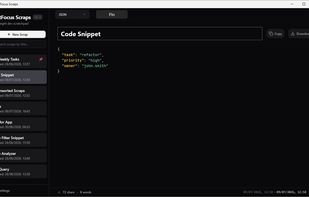
Minimal editor with instant auto-save, no accounts, no cloud, and no telemetry.

Cost / License

  • Free
  • Proprietary

Platforms

  • Windows
0likes
0comments
0articles

Features

Properties

  1.  Privacy focused
  2.  Lightweight
  3.  Local-First

Features

  1.  No Coding Required
  2.  Ad-free
  3.  No Tracking
  4.  Syntax Highlighting
  5.  No registration required
  6.  Dark Mode
  7.  Offline
  8.  Local Storage

iJustFocus Scraps News & Activities

Highlights All activities

Recent activities

iJustFocus Scraps information

  • Developed by

    GB flagHenata Technologies Ltd
  • Licensing

    Proprietary and Free product.
  • Alternatives

    3 alternatives listed
  • Supported Languages

    • English

AlternativeTo Category

Development
iJustFocus Scraps was added to AlternativeTo by ijustfocus on and this page was last updated .
No comments or reviews, maybe you want to be first?

What is iJustFocus Scraps?

iJustFocus Scraps is a fast, minimal scratchpad built for capturing small notes, ideas, and code snippets without friction. It opens instantly, stays out of your way, and saves everything locally on your device — a clean space to write without accounts, cloud services, or telemetry.

Scraps is designed for moments when you don’t want a full notes app. You simply want to jot something down right now. It’s ideal for temporary notes, quick ideas, scratch calculations, draft text, and developer snippets.

The sidebar makes it easy to browse, pin, and filter scraps by title. Sorting order (title, created, or last updated) is controlled through user preferences in Settings. Syntax highlighting supports 20+ languages including Markdown, JSON, SQL, HTML, CSS, JavaScript, TypeScript, Python, Rust, Go, C, C++, C#, Java, Bash, and more.

Each scrap includes detailed statistics such as characters, words, lines, payload size, and trailing spaces — useful for both developers and writers. The settings panel offers dark mode, line numbers, word wrap, default syntax, editor font size, font family, and date/time formatting.
