Sawti icon
Sawti icon

Sawti

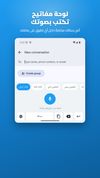
Voice dictation built for Arabic speakers: speak Arabic in your own dialect and get clean Arabic text or clear professional English typed into any app.

Sawti screenshot 1
Sawti screenshot 2
Sawti screenshot 3

Cost / License

  • Subscription
  • Proprietary

Platforms

  • Windows
  • Mac
  • Android
  • iPhone
  • iPad
1like
0articles

Features

Properties

  1.  AI-Powered

Features

  1.  Dark Mode
  2.  Ad-free
  3.  Dictation
  4.  Translator
  5.  Speech to text
  6.  Voice dictation

Sawti News & Activities

Highlights All activities

Recent activities

Sawti information

  • Developed by

    FR flagSawti
  • Licensing

    Proprietary and Commercial product.
  • Pricing

    Subscription ranging between $6 and $10 per month.
  • Alternatives

    9 alternatives listed
  • Badge

    Get an embeddable badge for Sawti
  • Supported Languages

    • English
    • Arabic

AlternativeTo Category

Education & Reference
Sawti was added to AlternativeTo by Rami-Hanna on and this page was last updated .
No comments or reviews, maybe you want to be first?

Official Links

What is Sawti?

Most dictation apps transcribe you in the language you spoke. Sawti works as a bridge instead: you speak everyday Arabic, in your own dialect, and it types the result into whatever app is in front of you, either as clean Arabic or as clear English.

Five writing modes:

  • Literal Dictation: a clean transcript in the language you spoke. Dialect stays dialect.
  • Smart: any Arabic dialect becomes polished Modern Standard Arabic.
  • Casual English: speak Arabic, get natural everyday English.
  • Formal English: speak Arabic, get professional business English.
  • Vibe Code: describe a feature or a bug in casual Arabic and get the same request in clear developer English, ready for an AI coding tool. Nothing is added and nothing is answered for you.

Read-back goes the other way: select English text and get plain Arabic that explains the jargon instead of translating it word for word. Read-back is available on Windows, Mac, iPhone and iPad.

On Windows and Mac you press a hotkey, talk, and press again; the text is pasted where your cursor is. On Android and iPhone/iPad, Sawti is a voice keyboard you can use inside any app.

Sawti is an independent app. It types text into the active application and is not an integration with any AI assistant. Recordings are sent once for transcription and are not stored. The interface is Arabic first, with English available.

Free for one week with no card required, then a monthly or yearly subscription that covers all your devices.