Apps tagged with 'Subtitle Editor' Page 2 of 4

All apps in Apps tagged with 'Subtitle Editor' category. Use the filters below to narrow down your search. 
Copy a direct link to this comment to your clipboard
  1. VisualSubSync icon
     6 likes

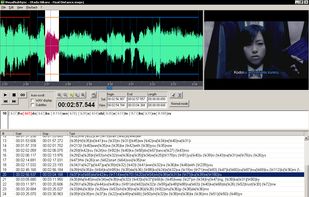
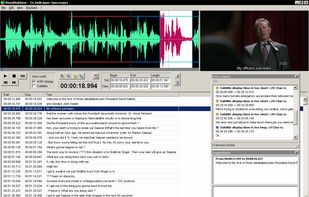
    VisualSubSync is a subtitle program aimed to facilitate subtitle synchronization by showing you the audio form and allowing the WORLD to see the subtitle timestamp breakdowns via a webpage and allowing them to submit corrections.
    Cost / License

    Application type

    Since

    • Since 2010

    Alerts

    • Discontinued

    Platforms

    • Windows
    VisualSubSync screenshot 1
    VisualSubSync screenshot 2
    31 alternatives
  2. AHD Subtitles Maker is a powerful tool designed to work with Windows. It permits you to create the most common text-based subtitle formats in minutes.

    Cost / License

    Application type

    Since

    • Since 2015 (updated Jan 2022)

    GitHub

    • GitHub stars: 2

    Platforms

    • Windows
    AHD Subtitles Maker screenshot 1
    32 alternatives
  3. Tscaps icon
     2 likes

    Tscaps is a free video editor for TikTok, Reels and Shorts, focused on subtitles. Drop a video, get the speech transcribed, style the captions, and export the video with the captions rendered into the pixels.

    Cost / License

    • Freemium (Subscription)
    • Open Source (AGPL-3.0)

    Application type

    Since

    • Since 2026 (updated Nov 2026)

    GitHub

    • GitHub stars: 135

    Platforms

    • Online
    The editor in the Captions tab. Pick a template, then change its typography, style, position and motion. Every template is CSS you can edit.
    The AI editor adds a title over the opening shot from a request in plain words. Each reply is a checkpoint you can go back to.
    The same video with five of the 50 caption templates.
    +2
    Emojis picked by AI for each caption, placed above, below, around or inside the line.
    10 alternatives
  4. Jubler icon
     7 likes

    Jubler is a tool to edit text-based subtitles. It can be used as an authoring software for new subtitles or as a tool to convert, transform, correct and refine existing subtitles. The most popular subtitle formats can be used.

    Cost / License

    • Free
    • Open Source

    Application type

    Since

    • Since 2009

    Platforms

    • Windows
    • Mac
    • Linux
    Jubler screenshot 2
    Jubler screenshot 1
    36 alternatives
  5. Translating subtitles in format SubRip from one natural language to other. It is based on Google Translate without API and therefore without payment. Translator have automatic and manual spell checkers.

    Cost / License

    • Free Personal
    • Proprietary

    Application type

    Since

    • Since 2016

    Platforms

    • Windows
    • Mac
    • Linux
    SRT Translator screenshot 1
    SRT Translator screenshot 2
    SRT Translator screenshot 3
    SRT Translator screenshot 4
    8 alternatives
  6. SubCreator icon
     2 likes

    SubCreator supports creation of subtitles from scratch or basing on existing text script. The application handles most common subtitle formats like time format, frame format, SRT, SSA or SAMI. It offers many addition features supporting timing processing, converting and...

    Cost / License

    • Free
    • Proprietary

    Application type

    Since

    • Since 2010

    Platforms

    • Windows
    • PL flagPoland
    • European Union flagEU
    SubCreator screenshot 1
    32 alternatives
  7. Professional AI subtitles, not just captions. Get an SRT file and a burned-in video, built on 40+ years of subtitling expertise.

    Cost / License

    • Pay once
    • Proprietary

    Application type

    Since

    • Since 2026

    Platforms

    • Online
    • Software as a Service (SaaS)
    • NL flagNetherlands
    • European Union flagEU
    Subtitling.net | Professional Subtitles vs. Captions
    Subtitling.net AI Subtitle Generator
    16 alternatives
  8. Zoupyu icon
     3 likes

    Zoupyu finds potential viral moments in your stream or video. You pick and trim them to perfection, and it renders 9:16 clips with burned-in subtitles.

    Cost / License

    • Freemium (Usage-based)
    • Proprietary

    Application type

    Since

    • Since 2026

    Platforms

    • Online
    • IN flagIndia
    Paste a YouTube, Twitch Google Drive link
    Select, edit and trim the moments to perfection
    Select, edit and trim the moments to perfection #2
    +2
    Get your clips
    56 alternatives
  9. SRTEd icon
     5 likes

    SRTEd is a graphical editor for SRT subtitles, the most simple and widespread subtitle file format for movies, and which can also be uploaded into YouTube videos as Closed Captions. The intuitive user interface makes it easy to work with small and large files, making sub editing...

    Cost / License

    • Free
    • Proprietary

    Application type

    Since

    • Since 2016

    Platforms

    • Windows
    SRTEd screenshot 1
    37 alternatives
  10. SKALDA FLINT icon
     1 like

    FLINT is a privacy-first, in-browser file toolkit with a multi-format converter (100+ formats), PDF organizer, file metadata cleaner, and subtitle fixer—no uploads, no logins, no tracking, and no file size limits.

    Cost / License

    • Free
    • Proprietary

    Since

    • Since 2025

    Platforms

    • Online
    • Global
    SKALDA FLINT screenshot 1
    File Converter
    PDF Organizer
    +1
    Metadata Tools
    50 alternatives
  11. Vokal icon
     2 likes

    Create beautiful social media videos including waveforms and subtitles for audio clips from your podcast, radio show, music, and more.

    Cost / License

    • Freemium (Subscription)
    • Proprietary

    Application type

    Since

    • Since 2020

    Platforms

    • Online
    • Software as a Service (SaaS)
    • IN flagIndia
    Use our full-fledged editor to create stunning videos.
    Vokal landing page
    Select one of our designer-made templates to base your video on.
    Your dashboard
    23 alternatives
  12. GeekLink icon
     1 like

    GeekLink is a desktop subtitle app for Mac and Windows. Extract burned-in subtitles from video with OCR, transcribe speech, translate subtitle files into 40+ languages, review and edit text and timing, then export SRT/TXT or burned-in video.

    Cost / License

    • Freemium (Pay once or Subscription)
    • Proprietary

    Application type

    Since

    • Since 2026

    Platforms

    • Windows
    • Mac
    • US flagUnited States
    GeekLink screenshot 1
    GeekLink screenshot 2
    GeekLink screenshot 3
    +6
    GeekLink screenshot 4
    40 alternatives
  13. RiverScript icon
     1 like

    AI transcription platform with Live Recording Transcription. Record and transcribe everything you hear on your Windows or Mac computer, including system audio. Also upload audio and video files up to 50GB for AI transcription, translation, subtitles, and summaries.

    Cost / License

    • Freemium (Subscription)
    • Proprietary

    Application type

    Since

    • Since 2026

    Platforms

    • Windows
    • Mac
    • Online
    • Software as a Service (SaaS)
    • FI flagFinland
    • European Union flagEU
    RiverScript AI workflow interface
    RiverScript website
    17 alternatives
  14. Storysonic icon
     1 like

    Storysonic finds the best moments in your long video and turns them into ready-to-post clips in minutes. Optimize for strong hooks, engaging content, and virality in one click. Reach your viewers even on mute with automatic subtitles generated by modern industry-leading AI...

    Cost / License

    • Subscription
    • Proprietary

    Application type

    Since

    • Since 2026

    Platforms

    • Online
    • Software as a Service (SaaS)
    • US flagUnited States
    Storysonic screenshot 1
    8 alternatives
  15. Subs Factory makes subtitling easier! It is a powerful utility designed to perform the creation, modification, and resynchronization of subtitles efficiently. Featuring advanced functions, it allows you to do whatever you want with your subtitles. It mainly works with .

    Cost / License

    • Pay once
    • Proprietary

    Application type

    Since

    • Since 2014

    Platforms

    • Mac
    Subs Factory screenshot 1
    Subs Factory screenshot 2
    26 alternatives
  16. DVDSubEdit allows you to visualize and make modifications to subpics (subtitles or button highlights in menus) directly inside VOB video files without the need to demux and remux the subpic stream. It can also extract subtitles to a SubRip formatted (.srt) file.

    Cost / License

    • Free
    • Open Source

    Application type

    Since

    • Since 2014

    Alerts

    • Discontinued

    Platforms

    • Windows
    DVDSubEdit screenshot 1
    10 alternatives
  17. YouTube's built-in subtitle editor doesn't support styling of any kind. If you want formatting such as bold, italic and coloring, you need to upload a subtitle file instead. The site accepts a number of file formats such as RealText, WebVTT and TTML, but all of these...

    Cost / License

    • Free
    • Open Source (MIT)

    Application type

    Since

    • Since 2024 (updated Aug 2025)

    GitHub

    • GitHub stars: 950

    Platforms

    • Windows
    • Mac
    • Linux
    • DE flagGermany
    • European Union flagEU
    YTSubConverter screenshot 1
    YTSubConverter screenshot 2
    41 alternatives
  18. CueForge icon
     Like

    CueForge is a subtitle and caption tool that runs entirely in the browser. Every parse, format conversion, QC check and re-sync happens on your own machine, and files never upload. The only network calls it makes are a Pro licence check and cookieless page-view counting.

    Cost / License

    • Freemium (Subscription)
    • Proprietary

    Application type

    Since

    • Since 2026

    Platforms

    • Online
    Studio
    Conversion
    Batch
    +4
    QC
    6 alternatives
  19. Online caption generator that transcribes your video, lets you edit and translate the captions, and exports SRT, VTT, TXT or a watermark-free MP4.

    Cost / License

    • Freemium (Subscription)
    • Proprietary

    Application type

    Since

    • New

    Platforms

    • Online
    • IE flagIreland
    • European Union flagEU
    Captions Generator screenshot 1
    8 alternatives
  20. AddSubtitle gives creators full control over how your message meets the world. Subtitles, voiceover, and translation—all in one tool to speed up your video workflow. Experience the perfect balance of efficiency and creative control.

    Cost / License

    • Freemium (Subscription)
    • Proprietary

    Application type

    Since

    • Since 2025

    Platforms

    • Online
    • CN flagChina
    Website
    Dashboard
    Editing Panel
    16 alternatives