

Subtitling.net SRT Editor
Most SRT editors let you change text and timecodes. This one also tells you whether the result is actually good.
Features
Properties
- Lightweight
- Privacy focused
Features
- Dark Mode
- Works Offline
- No registration required
- Ad-free
- Support for 4K
- No Tracking
Tags
- no-account
- Sync Subtitles
- cue-duration-check
- subtitle-sync
- line-length-check
- merge-cues
- subtitle-standards
- srt-editor
- browser-subtitle-editor
- split-cues
- subtitle-timing
- auto-fix-subtitles
- subtitle-validator
- export-to-srt
- reading-speed-check
- no-upload
- subtitle-quality-check
- online-subtitle-editor
- caption-editor
- overlap-detection
- merge-subtitles
- split-subtitles
- free-subtitle-editor
Subtitling.net SRT Editor News & Activities
Recent activities
- timdrex rated Subtitling.net SRT Editor
- timdrex liked Subtitling.net SRT Editor
- subtitlingnet added Subtitling.net SRT Editor
- subtitlingnet rated Subtitling.net SRT Editor
- subtitlingnet liked Subtitling.net SRT Editor
subtitlingnet added Subtitling.net SRT Editor as alternative to Subtitle Edit, Aegisub, Subtitle Workshop and Subtitle Composer
Subtitling.net SRT Editor information
What is Subtitling.net SRT Editor?
Most SRT editors let you change text and timecodes. This one also tells you whether the result is actually good.
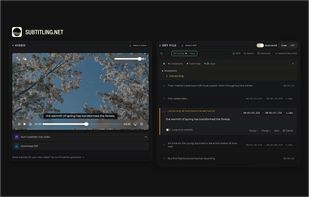
Every cue is checked in real time against professional broadcast subtitle standards: reading speed, line length, line count, duration and minimum gaps. The file gets an overall quality grade from A to F. Problems that would only appear during playback are visible before you publish or burn the subtitles into a video.
A one-click auto-fix resolves the structural problems: sorts cue order, cleans timecodes, fixes overlaps, renumbers indexes, and removes stray whitespace.
Standard editing is all there: timecode and text editing, split and merge cues, add and delete cues anywhere in the file, global time shift for sync correction, 100ms nudge with arrow keys, two editing modes (blocks view or raw SRT), and video preview for checking timing against the actual footage.
Runs entirely in your browser. Nothing is uploaded. No account, no installation, any OS. Once the page has loaded, the editor works without an internet connection.
Built by Subtitling.net, a professional subtitling company since 1986. The quality checks are based on the same broadcast subtitle guidelines used in their own production work.



