The Best Open Source Joplin AlternativesTop Note-taking Tools & Todo List Managers like Joplin

The best open source alternative to Joplin is Super Productivity. If that doesn't suit you, our users have ranked more than 100 alternatives to Joplin and loads of them is open source so hopefully you can find a suitable replacement. Other interesting open source alternatives to Joplin are Logseq, Standard Notes, Zettlr and Notesnook.

filter to find the best alternatives

Joplin alternatives are mainly Note-taking Tools, but if you're looking for Todo List Managers or Task Management Tools you can filter on that. Other popular filters include Android + Open Source, Self-Hosted, Open Source, Free and Note-taking. These are just examples - use the filter bar below to find more specific alternatives to Joplin.
Copy a direct link to this comment to your clipboard
Get a badge for your siteJoplin alternatives page was last updated

Alternatives list

  1. Workspace with end-to-end encryption, zero-knowledge security, rich notes, private journal, encrypted file storage, password management, cross-platform browser access, open-source cryptography, optional Pro features, and no recurring subscription fees.

    • Mac
    • Windows
    • Linux
    • Online
    • Android
    • iPhone
    • iPad
    • Google Chrome
    • Software as a Service (SaaS)
    • US flagUnited States
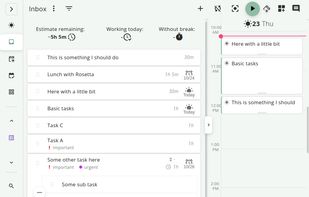
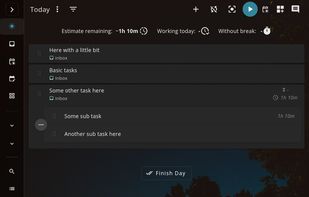
  2. Free, open-source software offering task management and time tracking across Linux, MacOS, and Windows with Jira, GitHub, and GitLab integration, plus a pomodoro timer for breaks and focus. Designed with privacy in mind, it requires no user data collection or registration.

    366 Super Productivity alternatives

    Cost / License

    • Free
    • Open Source (MIT)

    Platforms

    • Mac
    • Windows
    • Linux
    • Online
    • Android
    • iPhone
    • Chrome OS
    • Android Tablet
    • iPad
    • Self-Hosted
    • AppImageHub
    • Snapcraft
    • Flathub
    • F-Droid
    • Flatpak
    • AppImage
     
    |
    1
    Super Productivity vs Joplin Comments
    ailuridae
    Negative
    2

    Super Productive is a time and task management and tracker system, not a note taking app.

    • Super Productivity is Free and Open SourceJoplin is Freemium and Open Source
    • Super Productivity is a Todo List Manager Joplin is a Note-taking Tool
  3. Logseq icon
     356 likes

    Local-first, privacy-focused notebook supporting Markdown and Emacs Org mode. Offers offline use, encrypted backups, plugin extensibility, LaTeX support, real-time collaboration, and hierarchical organization for personal knowledge management.

    253 Logseq alternatives

    Cost / License

    Platforms

    • Mac
    • Windows
    • Linux
    • Android
    • iPhone
    • iPad
    • Self-Hosted
    • Flathub
    • F-Droid
     
    |
    1
    Logseq vs Joplin Comments
    bentsoft
    Negative
    2

    no folders :(, all your notes are just thrown together

    • Logseq is Free and Open SourceJoplin is Freemium and Open Source
    • Logseq is CustomizableJoplin is not according to our users
  4. Standard Notes icon
     708 likes

    Secure note-taking app with end-to-end encryption, unlimited syncing across all platforms, offline access, detailed organization through tags, strong passcode and biometric protections, and premium features like encrypted files, themes, web clipper, super note types, and hardware key support.

    214 Standard Notes alternatives

    Cost / License

    Platforms

    • Mac
    • Windows
    • Linux
    • Online
    • Android
    • iPhone
    • Chrome OS
    • Android Tablet
    • iPad
    • Self-Hosted
    • F-Droid
     
    |
    5
    Standard Notes vs Joplin Comments
    Top Positive Comment
    garrry
    6

    basic features are paywalled and the cost has doubled over the years

    Top Negative Comment
    bentsoft
    7

    folders & themes are paywalled. it only allows for plain text notes in the free plan

    ztdzyvhb
    Positive
    -1

    It’s a lot more simple and easy to use. The security is better than Joplin thanks to on-device storage encryption.

    3 of 5 comments
    • Standard Notes is Freemium and Open SourceJoplin is also Freemium and Open Source
    • Standard Notes is Security-focused and CustomizableJoplin is not according to our users
  5. Zettlr icon
     266 likes

    Unified writing platform offering note-taking, easy citations with Zotero integration, LaTeX/Word templates, snippets, themes, dark modes, code highlighting, multi-language support, and knowledge management with Zettelkasten for seamless writing from notes to books.

    243 Zettlr alternatives

    Cost / License

    Application types

    Platforms

    • Mac
    • Windows
    • Linux
    • Flathub
    • PortableApps.com
     
  6. Notesnook icon
     219 likes

    Offers open-source, end-to-end encrypted notes with device-based privacy, cross-platform support, private vault, secure sync, offline access, markdown editor, exports to multiple formats, automatic backups, organizational tools, and strong encryption.

    389 Notesnook alternatives

    Cost / License

    Platforms

    • Mac
    • Windows
    • Linux
    • Online
    • Android
    • iPhone
    • Android Tablet
    • iPad
    • Google Chrome
    • Flathub
    • F-Droid
    • Software as a Service (SaaS)
    • Flatpak
    • Self-Hosted
     
  7. AppFlowy icon
     213 likes

    Open-source workspace offering complete data control, deep customization via themes, plugins, and templates, native multi-platform support using Flutter and Rust, offline access, privacy features, collaborative tools, and easy extensibility for all users.

    151 AppFlowy alternatives

    Cost / License

    Platforms

    • Mac
    • Windows
    • Linux
    • Android
    • iPhone
    • Self-Hosted
    • Snapcraft
    • Rust
    • Flathub
     
  8. Simplenote icon
     612 likes

    Cloud-based, open-source note-taking app supporting plain text notes, lists, and ideas with real-time sync, multi-device support, version history, markdown, tagging, collaborative editing, no ads, and free registration required for all cloud features.

    189 Simplenote alternatives

    Cost / License

    Alerts

    • Discontinued

    Platforms

    • Mac
    • Windows
    • Linux
    • Online
    • Android
    • iPhone
    • Android Tablet
    • iPad
     
    |
    2
    Simplenote vs Joplin Comments
    bentsoft
    0

    Good app by itself, but not as comprehensive as Joplin, it's much simpler and lighter

    Guest
    Positive
    1

    Unlike Joplin, this has a web-based version. The Android version is also very lightweight.

    • Simplenote is Free and Open SourceJoplin is Freemium and Open Source
  9. Zim icon
     519 likes

    Zim brings the concept of a wiki to your desktop. Store information, link pages and edit with WYSISYG markup or directly typing some lightweight markup syntax and see it previewed as-you-type. Creating a new page is easy by either clicking on the "Create new note"...

    360 Zim alternatives

    Cost / License

    Platforms

    • Mac
    • Windows
    • Linux
    • BSD
    • Flathub
    • Flatpak
     
    |
    3
    Zim vs Joplin Comments
    Sam Lander
    Positive
    1

    Zim is more lightweight, less buggy, saves in plain text. So you don't have to worry about any bloated configurations and high attack surfaces. Just put your folder in a VeraCrypt vault in a cloud drive.

    Guest
    Negative
    2

    Zim is a desktop Wiki System and wiki editor, not a multifunction note taking and data synchronizing platform. Joplin and Zim may be complimentory in use and apear to have similar fuctions, but they serve very different purposes. It is like comparing a text editor (e.g. Emacs) to a word processor (MS Word). One can use either to write program code or a novel; however, it is best to match the tool to the job (i.e. a text ditor for the code and a word processor for the novel).

    Harvey Williams
    Negative
    -11

    Joplin offers syncing functionality with other services (such as OwnCloud/Nextcliud) where as Zim only gives you access to the files so you can sync them.

    • Zim is Free and Open SourceJoplin is Freemium and Open Source
  10. CherryTree icon
     333 likes

    Hierarchical note-taking software that is free, open-source, cross-platform. Features include rich text, syntax highlighting, multi-level lists, embedded files, customizable interface, code execution, PDF export, spell check, images & tables, and comprehensive project management support.

    151 CherryTree alternatives

    Cost / License

    • Free
    • Open Source

    Platforms

    • Mac
    • Windows
    • Linux
    • Flathub
    • PortableApps.com
    • Flatpak
     
    |
    2
    CherryTree vs Joplin Comments
    andgregorik
    Positive
    4

    CherryTree has more elaborate hierarchy features and less elaborate to-do features. It is not into cloud-based cross-platform syncing, but makes it up with having a very natural feel on a desktop.

    Farrukh
    Positive
    0

    it does not support MarkDown as so cannot be compared to Joplin. However, it has its own good features.

    • CherryTree is Free and Open SourceJoplin is Freemium and Open Source
    • CherryTree is CustomizableJoplin is not according to our users
  11. Trilium Notes icon
     127 likes

    The original trilium is transfered to this repo by its owner and the app continues to develop here as stated here: https://github.com/TriliumNext/Trilium

    430 Trilium Notes alternatives

    Cost / License

    Platforms

    • Mac
    • Windows
    • Linux
    • Self-Hosted
    • Google Chrome
    • Cloudron
    • Mozilla Firefox
     
    |
    1
    Trilium Notes vs Joplin Comments
    Guest
    Positive
    2

    Awesome note taking app with E2E encryption only bad thing is another Java/Electron application. Really hard on resources of older devices even if sync is off.

    • Trilium Notes is Free and Open SourceJoplin is Freemium and Open Source
    • Trilium Notes is CustomizableJoplin is not according to our users
12 of 100 Joplin alternatives