

File Explorer Software

Browse 62 File Explorer Software on AlternativeTo.

Copy a direct link to this comment to your clipboard
  1. File Converter icon
     173 likes

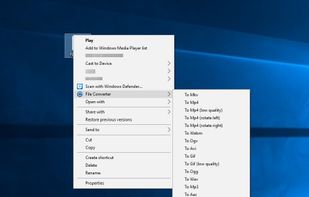
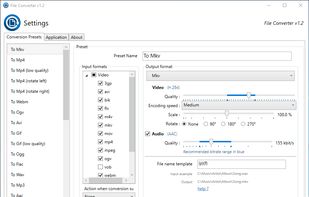
    File Converter is a very simple tool which allows you to convert and compress one or several file(s) using the context menu in Windows Explorer.

    Cost / License

    Application type

    Since

    • Since 2016 (updated Oct 2026)

    GitHub

    • GitHub stars: 15.7k

    Platforms

    • Windows
    • File Explorer
    • FR flagFrance
    • European Union flagEU
    File Converter screenshot 1
    File Converter screenshot 2
    334 alternatives
    4.6
    Excellent19 ratings
  2. Listary icon
     285 likes

    Listary is a revolutionary search utility for Windows that makes finding your files and launching applications blazing fast, for casual and power users alike!.

    Cost / License

    • Freemium (Pay once)
    • Proprietary

    Application type

    Since

    • Since 2010

    Platforms

    • Windows
    • PortableApps.com
    • File Explorer
    • CN flagChina
    Global Search
    Web Search
    Listary screenshot 3
    General Settings
    147 alternatives
    4.3
    Very Good19 ratings
  3. QTTabBar icon
     178 likes

    QTTabBar is an extension for Windows Explorer that brings tabbed browsing to Microsoft's file browser. It comes with a number of nifty features including a favorites function for launching folders and applications, groupings of folders that can be opened together, tooltip...

    Cost / License

    Application type

    Since

    • Since 2010 (updated Nov 2026)

    GitHub

    • GitHub stars: 5k

    Platforms

    • Windows
    • Windows Explorer
    • JP flagJapan
    Tabbed Explorer
    QTTabBar screenshot 2
    QTTabBar screenshot 3
    40 alternatives
    4.6
    Excellent24 ratings
  4. File-integrity verification with CRC-32, MD5, SHA-1, SHA-2 and SHA-3, integrated into Windows file-properties dialog box.

    Cost / License

    • Free
    • Open Source

    Since

    • Since 2010 (updated Oct 2026)

    GitHub

    • GitHub stars: 404

    Platforms

    • Windows
    • Windows Explorer
    • FR flagFrance
    • European Union flagEU
    HashCheck Shell Extension screenshot 1
    HashCheck Shell Extension screenshot 2
    +1
    HashCheck Shell Extension screenshot 3
    58 alternatives
    4.0
    Very Good12 ratings
  5. Clover icon
     238 likes

    Wings for your Windows Explorer!

    Clover is an extension of the Windows Explorer, to add multi-tab functionality similar to Google Chrome browser. After Clover is installed, you will be able to open multiple folders in tabs within the same window, and you can also be able to add.

    Cost / License

    • Free
    • Proprietary

    Application type

    Since

    • Since 2012

    Alerts

    • Bundleware
    • Discontinued

    Platforms

    • Windows
    • Windows Explorer
    • CN flagChina
    Entire app window
    Clover in action on Windows 7 Classic Theme looks neat too. In the screenshot we're seeing also it's bookmarks bar.
    That's how tab looks here
    +3
    Upper menu
    13 alternatives
    3.2
  6. Link Shell Extension (LSE) provides for the creation of Hardlinks , Junctions , Volume Mountpoints , and Vistas Symbolic Links, (herein referred to collectively as Links) and a Folder Cloning process that utilizes Hardlinks or Symbolic Links.

    Cost / License

    • Free
    • Open Source

    Application type

    Since

    • Since 2010

    Platforms

    • Windows
    • File Explorer
    • Chocolatey
    • AT flagAustria
    • European Union flagEU
    Pick Link Source... (file/dir)
    and Drop As... Symbolic Link, Junction, Hard Link and more
    7 alternatives
  7. Easy Context Menu enables you to add a variety of useful commands and tweaks for the Desktop, My Computer, drives, file and folder context menus. It helps in accessing most used windows components quickly and easily, it doesn’t get much easier than to check some boxes and set up...

    Cost / License

    • Free
    • Proprietary

    Application type

    Since

    • Since 2014

    Alerts

    • Discontinued

    Platforms

    • Windows
    • File Explorer
    • TR flagTürkiye
    Easy Context Menu screenshot 1
    Easy Context Menu screenshot 2
    Easy Context Menu screenshot 3
    +2
    Easy Context Menu screenshot 4
    18 alternatives
    4.3
    Very Good15 ratings
  8. Icaros icon
     45 likes

    Icaros is a collection of lightweight, high quality, Windows Shell Extensions that provide Windows Explorer thumbnails for many media filetypes.

    Cost / License

    • Free
    • Proprietary

    Application type

    Since

    • Since 2014

    Platforms

    • Windows
    • File Explorer
    • SE flagSweden
    • European Union flagEU
    Icaros screenshot 1
    Icaros screenshot 2
    Icaros screenshot 3
    7 alternatives
  9. SageThumbs icon
     60 likes

    SageThumbs is a Windows Explorer context menu extension allowing Windows users to preview enormous amounts of image formats directly within Windows Explorer.

    Cost / License

    Application type

    Since

    • Since 2012

    Alerts

    • Discontinued

    Platforms

    • Windows
    • Windows Explorer
    • RU flagRussia
    SageThumbs screenshot 2
    SageThumbs screenshot 1
    SageThumbs screenshot 3
    20 alternatives
  10. ShellExView icon
     44 likes

    Shell Extensions are in-process COM objects which extends the abilities of Windows operating system. Most shell extensions are automatically installed by the operating system, but there are also many other applications that install additional shell extension components.

    Cost / License

    • Free
    • Proprietary

    Application type

    Since

    • Since 2009

    Alerts

    • Discontinued

    Platforms

    • Windows
    • File Explorer
    • IL flagIsrael
    ShellExView screenshot 1
    14 alternatives
  11. SageThumbs 2K icon
     13 likes

    A modern, crash-isolated Rust shell extension for Windows 11, the clean-room revival of the legendary (but decade-abandoned) SageThumbs.

    Cost / License

    • Free
    • Open Source

    Application type

    Since

    • Since 2026 (updated Nov 2026)

    GitHub

    • GitHub stars: 308

    Platforms

    • Windows
    • File Explorer
    SageThumbs 2K screenshot 1
    SageThumbs 2K screenshot 2
    4 alternatives
  12. TaskSpace icon
     16 likes

    TaskSpace is a simple Windows application intended to group ANY applications in a single window(task space) to provide fast and easy access to multiple applications simultaneously(no Alt+Tab switching and/or searching for a program in the taskbar is required).

    Cost / License

    • Free Personal
    • Proprietary

    Application type

    Since

    • Since 2013

    Platforms

    • Windows
    • Windows Explorer
    • US flagUnited States
    TaskSpace screenshot 1
    23 alternatives
  13. Image Resizer for Windows is a utility that lets you resize one or more selected image files directly from Windows Explorer by right-clicking.

    Cost / License

    • Free
    • Open Source

    Since

    • Since 2010 (archived)

    GitHub

    • GitHub stars: 1k

    Platforms

    • Windows
    • Windows Explorer
    • US flagUnited States
    Image Resizer for Windows screenshot 1
    Image Resizer for Windows screenshot 2
    60 alternatives
  14. XnShell icon
     19 likes

    XnShell is a free File Explorer extension that installs a number of image-related tools in the right-click context menu, including a thumbnail preview, image conversion to a wide variety of formats, image resizing, editing image IPTC...

    Cost / License

    • Free
    • Proprietary

    Application type

    Since

    • Since 2010

    Platforms

    • Windows
    • Windows Explorer
    • FR flagFrance
    • European Union flagEU
    XnShell screenshot 1
    XnShell screenshot 2
    32 alternatives
  15. Folders Popup icon
     30 likes

    Folders Popup lets you move like a breeze between your frequently used folders, documents and links! Have all your favorites at your finger tip - press the middle mouse button to popup your personalized menu.

    Cost / License

    • Free
    • Open Source

    Since

    • Since 2014 (updated May 2016)

    GitHub

    • GitHub stars: 50

    Platforms

    • Windows
    • Windows Explorer
    • CA flagCanada
    tray tip
    popup menu
    special menu
    +10
    settings
    15 alternatives
  16. FlashFolder icon
     24 likes

    FlashFolder is an open source tool that extends the file-related common dialogs (e.g. open/save dialog) seen in most Windows applications. A small toolbar docks onto these dialogs that provides menus for quick access to recently-used folders, favorite folders and more.

    Cost / License

    • Free
    • Open Source

    Since

    • Since 2009

    Alerts

    • Discontinued

    Platforms

    • Windows
    • Windows Explorer
    • DE flagGermany
    • European Union flagEU
    Screenshot: FlashFolder toolbar attached to common file open dialog
    Screenshot: FlashFolder options dialog
    15 alternatives
  17. Pictus icon
     14 likes

    Pictus is a fast, free image viewer that enables Windows to see thumbnails of supported formats, such as PSD. Give it a spin today!

    Cost / License

    • Free
    • Open Source

    Application type

    Since

    • Since 2013

    Alerts

    • Discontinued

    Platforms

    • Windows
    • Windows Explorer
    • SE flagSweden
    • European Union flagEU
    Pictus screenshot 1
    19 alternatives
  18. eXtra Buttons icon
     20 likes

    eXtra Buttons lets you add up to 10 additional buttons to the title bar of each window, which allow you to minimize the window to the tray, keep it on-top, send it to the background, adjust the window's transparency and more.

    Cost / License

    • Free
    • Proprietary

    Since

    • Since 2011

    Alerts

    • Discontinued

    Platforms

    • Windows
    • Windows Explorer
    Options - Buttons Set
    Options - Window Menu
    Themes
    11 alternatives
  19. DeskPins icon
     23 likes

    DeskPins can be used to make any application topmost, that is, to keep it above all other windows. Just grab a pin from the DeskPins icon in the system notification area (a.k.a. taskbar tray) and click on any window.

    Cost / License

    • Free
    • Open Source

    Since

    • Since 2011

    Alerts

    • Discontinued

    Platforms

    • Windows
    • Windows Explorer
    • GR flagGreece
    • European Union flagEU
    DeskPins screenshot 1
    20 alternatives
  20. Better Explorer icon
     12 likes

    This is a replacement for the standard Windows Explorer with more features for more convenience.

    Cost / License

    • Free
    • Open Source

    Application type

    Since

    • Since 2012 (updated May 2025)

    Alerts

    • Bundleware

    GitHub

    • GitHub stars: 212

    Platforms

    • Windows
    • Windows Explorer
    • Global
    Better Explorer screenshot 1
    Better Explorer screenshot 2
    Better Explorer screenshot 3
    60 alternatives