


SageThumbs
60 likes
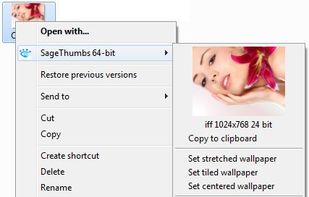
SageThumbs is a Windows Explorer context menu extension allowing Windows users to preview enormous amounts of image formats directly within Windows Explorer.

Platforms
- Windows
- Windows Explorer


Discontinued
The latest version 2.0.0.23 was released on May 9th, 2017.

Features

SageThumbs News & Activities
Highlights All activities
Recent News
No news, maybe you know any news worth sharing?
Share a News Tip
Recent activities
 GabrielDja added SageThumbs as alternative to SageThumbs 2K
 Dalieba added SageThumbs as alternative to SKIA Shell Extensions and Lottie Editor


SageThumbs information
Developed by
 Nikolay Raspopov
 Licensing
Open Source (GPL-2.0) and Free product.Rating
Average rating of 4Alternatives
19 alternatives listedBadge
Get an embeddable badge for SageThumbsSupported Languages


Featured in Lists


My Windows Setup
My setup for a mix of development work and general use.


Windows Utilities
A list with 35 apps by asphaltkisser without a description.


Windows
List of all the windows apps
Comments and Reviews
see this blog post to learn more:
https://resource.dopus.com/t/free-thumbnails-viewer-for-eps-pdf-32-64-bit-and-many-more/13703
Combining this with directoryopus let's you have .EPS format previews (.EPS is vector format for logo designs, similar to .AI for adobe illustator files)
Thanks @kagerJay for pointing out this program. Now I can see my PSD files including transparency. Excellent. Now I just need to find an image viewer I don't hate.
Try the combination of XnView (or the newer XnViewMP) with the shell extension XnShell.