Apps tagged with 'Volume Control' Page 4 of 4

All apps in Apps tagged with 'Volume Control' category. Use the filters below to narrow down your search. 
Copy a direct link to this comment to your clipboard
  1. Audio Config icon
     1 like

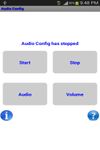
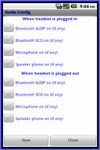
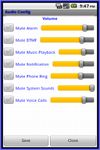
    This app help to centralize all audio settings related like various streams volume control, mute-ness and default action to take when headset plug in or plug out in one place. Although most other apps already have something similar, the option to control some of the features are...

    Cost / License

    • Free
    • Proprietary

    Application type

    Since

    • Since 2015

    Platforms

    • Android
    • Android Tablet
    • SG flagSingapore
    Audio Config screenshot 1
    Audio Config screenshot 2
    Audio Config screenshot 3
    4 alternatives
  2. Audio Master icon
     1 like

    Audio Master provides advanced audio controls for Chrome tabs, including volume amplification, equalizer settings, and per-tab audio management.

    Cost / License

    • Free
    • Proprietary

    Application type

    Since

    • Since 2026

    Platforms

    • Google Chrome
    • PL flagPoland
    • European Union flagEU
    Boost Tab Volume up to 800%
    Dark & Light Modes
    10-Band Equalizer
    Customizable Settings
    3 alternatives
  3. Stream audio wirelessly with your Philips TV, soundbars, and speakers. Whether listening to music or watching the big game, never miss a moment with the ease and flexibility of Philips Sound, powered by DTS(R) Play-Fi(R) .

    Cost / License

    • Free
    • Proprietary

    Application type

    Since

    • Since 2022 (updated Feb 2026)

    Platforms

    • iPhone
    • iPad
    • US flagUnited States
    Philips Sound screenshot 1
    Philips Sound screenshot 2
    +3
    Philips Sound screenshot 3
    4 alternatives
  4. Phorus icon
     Like

    Breakthrough DTS Play-Fi(R) technology powers simple, great-sounding whole-home wireless audio systems for smartphones and tablets. You can stream your favorite tunes over Wi-Fi right from the Play-Fi app to speakers from DTS Play-Fi product partners.

    Cost / License

    • Free
    • Proprietary

    Application type

    Since

    • Since 2022 (updated Nov 2025)

    Platforms

    • Windows
    • Android
    • iPhone
    • iPad
    • Android Tablet
    • US flagUnited States
    Phorus screenshot 1
    Phorus screenshot 2
    +3
    Phorus screenshot 3
    4 alternatives
  5. AudioBalance icon
     2 likes

    AudioBalance keeps the volume on your Windows PC steady. Quiet dialogue stays audible, and sudden loud scenes, ads or game effects are turned down automatically. It measures loudness to ITU-R BS.1770-4 and uses its own AI models to tell film, games, music and speech apart, then...

    Cost / License

    • Pay once or Subscription
    • Proprietary

    Since

    • New

    Platforms

    • Windows
    • BE flagBelgium
    • European Union flagEU
    AudioBalance screenshot 1
    AudioBalance screenshot 2
    AudioBalance screenshot 3
    AudioBalance screenshot 4
    9 alternatives
  6. Audio Owl icon
     Like

    Audio Owl adds Output, Input and Mixer buttons to the Windows 11 taskbar next to the notification area. Hover or click to pick a playback or recording device, set each app's volume, or mute your default microphone.

    Cost / License

    • Pay once
    • Proprietary

    Application type

    Since

    • New

    Platforms

    • Windows
    Audio Owl adds Output, Input and Mixer buttons to the Windows 11 taskbar
    The Audio Owl panel: pick speakers and microphones, set volume, mute the default mic
    4 alternatives
  7. Sordina icon
     Like

    Sordina is a menu bar app for macOS that gives every app its own volume slider and mute, so music, videos, games and calls can each sit at their own level. Change levels from the panel, by scrolling on the menu bar icon, or with keyboard shortcuts.

    Cost / License

    • Freemium (Pay once)
    • Proprietary

    Application type

    Since

    • New

    Platforms

    • Mac
    • NL flagNetherlands
    • European Union flagEU
    A volume slider and mute for every app, right from the menu bar.
    Calls settings: other apps turn down automatically while you're on a call. (Pro)
    Boost: make one app or every app louder than the Mac's maximum, with a limiter. (Pro)
    +2
    The panel as a mixer, with a vertical fader for each app.
    6 alternatives
  8. Displays information and current volume level for all active sound components on your system, enables saving a sound profile into a shortcut file to load later, or changing individual settings via a shortcut file with extensive command line support.

    Cost / License

    • Free
    • Proprietary

    Application type

    Since

    • Since 2021

    Platforms

    • Windows
    • IL flagIsrael
    Default view showing all sound device and application information
    View showing command-line friendly IDs of sound devices
    Create shortcut to mute and unmute an application, like your browser
    Example custom SoundVolumeView shortcut to mute/unmute Chrome browser with shortcut key
    7 alternatives
  9. A tactile control layer for your Mac. Sliders, dials, and your Dock overflow - hidden at the edges of your screen, revealed only when you reach for them.

    Cost / License

    • Pay once
    • Proprietary

    Since

    • Since 2026

    Platforms

    • Mac
    Stash for Mac screenshot 1
    Stash for Mac screenshot 2
    Stash for Mac screenshot 3
    21 alternatives
  10. Volume Balance adds a real audio compressor to Chrome and Firefox. Quiet videos get louder and loud videos get tamed, automatically, on every site: X, Instagram, TikTok, Reddit, YouTube and any page with embedded video, including clips that load while you scroll.

    Cost / License

    • Free
    • Proprietary

    Application type

    Since

    • New

    Platforms

    • Google Chrome
    • Mozilla Firefox
    • Brave
    • DE flagGermany
    • European Union flagEU
    Volume Balance screenshot 1
    Volume Balance screenshot 2
    +1
    Volume Balance screenshot 3
  11. Maxi SoundSet is an open-source, lightweight Windows audio leveler and equalizer built with Rust and the Slint UI framework. It dynamically stabilizes erratic volume jumps between quiet dialogue and loud action scenes in real time with near-zero latency.

    Cost / License

    Since

    • New

    GitHub

    • GitHub stars: 2

    Platforms

    • Windows
    Dashboard
    Equalizer
    Settings & Hotkeys
    14 alternatives
  12. Zenith icon
     Like

    Enhance & improve YouTube with Loop, Zoom, Audio EQ, Speed Control, QoL features & Themes. Take control for the ultimate experience.

    Cost / License

    • Freemium (Subscription)
    • Proprietary

    Since

    • Since 2026

    Platforms

    • Google Chrome
    • DK flagDenmark
    • European Union flagEU
    High customization: Background presets, Dynamic / animated backgrounds, Change color of: text, progress bar, background, accent colors, and other ui elements
    Tons of settings in the dashboard
    Fix the home feed layout and customize it as you want
    +1
    The popup have tons of easily accessible general settings, video setting, audio settings and more
    9 alternatives
  13. AppVol icon
     Like

    A free macOS menu-bar app for per-app volume - EQ - Compressor — set the level, mute, EQ and compressor of each app independently, with real VU meters, using Core Audio process taps (no audio driver).

    Cost / License

    • Free
    • Proprietary

    Application type

    Since

    • New

    Platforms

    • Mac
    • DE flagGermany
    • European Union flagEU
    AppVol screenshot 1
    AppVol screenshot 2
    +7
    AppVol screenshot 3
    9 alternatives
  14. Volume++ icon
     Like

    Volume++ is a native Android app that replaces the stock system volume panel with a fully custom, themeable one, and adds per-app volume mixing that Android doesn't normally expose to the user.

    Cost / License

    • Free
    • Open Source (MIT)

    Application type

    Since

    • New

    GitHub

    • GitHub stars: 149

    Platforms

    • Android
    Volume++ screenshot 1
    Volume++ screenshot 2
    Volume++ screenshot 3
    12 alternatives