
Awoo icon
Awoo icon

Awoo

 Like

A system-tray volume control for Windows 11, heavily inspired by the KDE Plasma 6.4 volume applet.
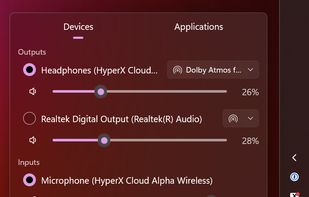
Awoo screenshot 1

Cost / License

  • Free
  • Open Source (MIT)

Application type

Since

  • New

Platforms

  • Windows
0likes
0articles
Save

Features

Features

Highlights All activities

Awoo News & Activities

Recent activities

Awoo information

AlternativeTo Category

Audio & Music

GitHub repository

  •  0 Stars
  •  0 Forks
  •  0 Open Issues
  •   Updated  
View on GitHub
Awoo was added to AlternativeTo by Infinifox on and this page was last updated .

No comments or reviews, maybe you want to be first?

Official Links

What is Awoo?

A system-tray volume control for Windows 11, heavily inspired by the KDE Plasma 6.4 volume applet.

Significantly enhances what's possible with the built-in windows volume slider by showing every device and every application, each with its own slider and its own mute, and lets you easily adjust volume and switch default devices all in one place.

Features:

  • The device you are listening on, switched from the flyout. Every active output and input, each with its own slider, percentage and mute, and one click to make any of them Windows' default.
  • Every application playing or recording, with its own icon, slider and mute — the same volumes Windows' mixer moves.
  • Per-application output routing. Send one application's sound to a device of its own, the thing Windows buries in Settings → System → Sound → App volume and device preferences.
  • Spatial sound per output. Off, Windows Sonic for Headphones, Dolby Atmos, DTS — whichever of them the device will actually take — from a dropdown beside its name. The one setting Windows' own volume flyout has that Awoo did not.
  • The Plasma applet's tray gestures. Scroll over the icon to change the volume, middle-click to mute.
  • A tray icon that is the volume, drawn from the system icon font, with the device and its percentage on hover.
  • One speaker in the tray, not two — a switch that takes Windows' own volume icon out of the notification area while Awoo is running, and puts it back when Awoo exits. Off by default.