
Audio Owl icon
Audio Owl icon

Audio Owl

 Like

Audio Owl adds Output, Input and Mixer buttons to the Windows 11 taskbar next to the notification area. Hover or click to pick a playback or recording device, set each app's volume, or mute your default microphone.
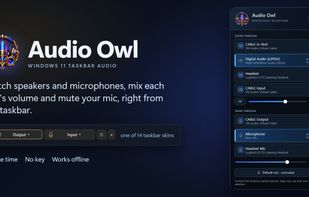
Audio Owl adds Output, Input and Mixer buttons to the Windows 11 taskbar

Cost / License

  • Pay once
  • Proprietary

Application type

Since

  • New

Platforms

  • Windows
0likes
0articles
Save

Features

Highlights All activities

Audio Owl News & Activities

Recent activities

Audio Owl information

  • Developed by

    BCR Software, LLC
  • Licensing

    Proprietary and Commercial product.
  • Pricing

    One time purchase (perpetual license) that costs $5.
  • Alternatives

    4 alternatives listed
  • Badge

    Get an embeddable badge for Audio Owl
  • Supported Languages

    • English

AlternativeTo Category

Audio & Music
Audio Owl was added to AlternativeTo by BCR-Software-LLC on and this page was last updated .

No comments or reviews, maybe you want to be first?

What is Audio Owl?

Audio Owl adds Output, Input and Mixer buttons to the Windows 11 taskbar next to the notification area. Hover or click to pick a playback or recording device, set each app's volume, or mute your default microphone. A floating desktop panel shows your devices and volume sliders when you want them in view. There is no activation key and no account, it works offline, and it hides behind full-screen video and games. It changes Windows' default devices, so apps that choose their own device keep using it. One-time purchase of $5.