
BetterVolume icon
BetterVolume icon

BetterVolume

 Like

Windows 11 tray utility to switch audio outputs in one click and set the volume of each app, with optional Home Assistant control.
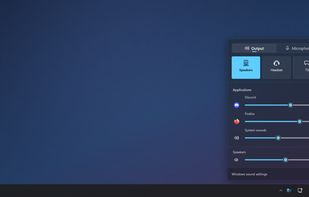
BetterVolume screenshot 1

Cost / License

  • Free
  • Open Source (MIT)

Since

  • New

Platforms

  • Windows
0likes
0articles
Save

Features

Properties

Features

Highlights All activities

BetterVolume News & Activities

Recent activities

BetterVolume information

  • Developed by

    FR flagmachintrucbidule
  • Licensing

    Open Source (MIT) and Free product.
  • Written in

  • Alternatives

    9 alternatives listed
  • Badge

    Get an embeddable badge for BetterVolume
  • Supported Languages

    • English
    • French
    • German
    • Portuguese
    • Spanish
    • Chinese
    • Japanese
    • Italian
    • Polish

AlternativeTo Category

Audio & Music

GitHub repository

  •  0 Stars
  •  0 Forks
  •  0 Open Issues
  •   Updated  
View on GitHub
BetterVolume was added to AlternativeTo by machintrucbidule on and this page was last updated .

No comments or reviews, maybe you want to be first?

What is BetterVolume?

BetterVolume is a lightweight tray utility for Windows 11: a click on its icon opens a volume panel that looks and moves like Windows 11. Each output device is a large tile: one click switches the media sound, the calls sound, or both. The panel also holds the master volume, the volume of each application playing sound and a microphone view.

The tray icon shows the volume level; the mouse wheel over it changes the volume and a middle click mutes. Devices can be renamed, reordered, hidden or given one of 27 icons, and applications can be reordered or hidden from the panel. A small bubble shows the new device when the output changes.

Optionally, each PC can be linked to Home Assistant over MQTT: output, volume, mute, microphone and media buttons appear as a device, updated in both directions, ready for automations. It can also replace the Windows volume icon of the taskbar (off by default).

It uses a few megabytes of memory and only reacts to events. It is available in ten languages and follows the Windows theme and accent colour. Free and open source (MIT licence), as an installer, a portable file or from the Microsoft Store.