




Volume Balance
Like
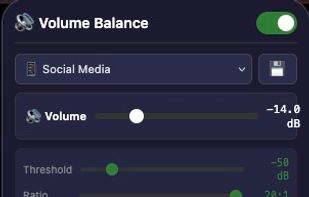
Volume Balance adds a real audio compressor to Chrome and Firefox. Quiet videos get louder and loud videos get tamed, automatically, on every site: X, Instagram, TikTok, Reddit, YouTube and any page with embedded video, including clips that load while you scroll.

Cost / License
- Free
- Proprietary
 EU
EUPlatforms
- Google Chrome
- Mozilla Firefox
- Brave



Features
Highlights All activities
Volume Balance News & Activities
Recent activities
- Mathias Schneider added Volume Balance
- Mathias Schneider updated Volume Balance
- Mathias Schneider updated Volume Balance
 Mathias Schneider added Volume Balance as alternative to Volume Master and Ears: Bass Boost, EQ Any Audio!

Developed by
 adelvo-software
 Licensing
Proprietary and Free product.Alternatives
2 alternatives listedBadge
Get an embeddable badge for Volume BalanceSupported Languages
No comments or reviews, maybe you want to be first?