Apps tagged with 'Text Editors' Page 21 of 22

All apps in Apps tagged with 'Text Editors' category. Use the filters below to narrow down your search. 
Copy a direct link to this comment to your clipboard
  1. nTilia icon
     Like

    nTilia is a Markdown notes app built for field work. You capture notes, photos and audio on the device, even without a network. When you are back online, you can edit, translate and publish. Nothing is sent to the cloud unless you choose to.

    Cost / License

    • Freemium
    • Proprietary

    Application type

    Platforms

    • Online
    • BE flagBelgium
    • European Union flagEU
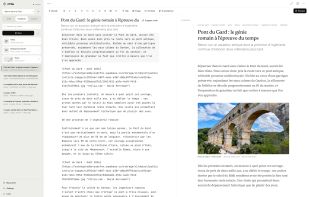
    nTilia editor: Markdown on the left, live preview on the right, with missions, takes and a GPS route in the sidebar.
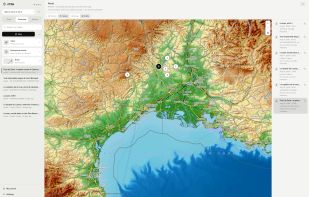
    Private GPS route for a mission: notes with location land on a map the public journal never sees.
    Public journal in English: the same Markdown notes, published as a bilingual field diary.
    +1
    Dark mode editor with the publication panel: public or private, device-only notes, FR/EN.
    5 alternatives
  2. Eddyter  icon
     Like

    AI-powered WYSIWYG rich text editor SDK for developers. Plug-and-play setup in ~10 minutes, fully managed AI, storage, and infrastructure, and ~3x cheaper than TinyMCE, CKEditor, and Quill.

    Cost / License

    • Free
    • Proprietary

    Application type

    Platforms

    • Online
    9 alternatives
  3. Penmob icon
     1 like

    Penmob is a space for writers and bloggers to improve their craft through real, human feedback.

    Cost / License

    • Paid
    • Proprietary

    Platforms

    • Online
    Homepage
    Screenshot of draft that has been workshopped by Penmob editors
    Editing example
    +3
    Editing example
    24 alternatives
  4. Zee icon
     Like

    Zee is a modern editor for the terminal, written in Rust. It is a highly experimental code. In the old tradition of text editor demos, here's what it currently looks like editing its own source code.

    Cost / License

    Application type

    Alerts

    • Discontinued

    Platforms

    • Mac
    • Windows
    • Linux
    • BSD
    Zee screenshot 1
    26 alternatives
  5. NyaoVim icon
     Like

    NyaoVim is a Neovim frontend built on Electron. The Neovim editor is composed as a Web Component and users can extend the UI with reusable Web Components, HTML, CSS and JavaScript.

    Cost / License

    • Free
    • Proprietary

    Application type

    Platforms

    • Self-Hosted
    NyaoVim screenshot 1
    NyaoVim screenshot 1
    NyaoVim screenshot 2
    11 alternatives
  6. Desktop LaTeX editor with live PDF preview, bidirectional SyncTeX, and one-key project snapshots.

    Cost / License

    Platforms

    • Windows
    • Linux
    • Mac
    • TR flagTürkiye
    LaTeX Editor screenshot 1
    LaTeX Editor screenshot 1
    LaTeX Editor screenshot 2
    +2
    LaTeX Editor screenshot 3
    8 alternatives
  7. dedtxt icon
     Like

    A dead simple plain-text editor. A bit like TextEdit or Notepad but even simpler and with fewer features. No hidden text. No formatting. No settings. One textarea and the current file. Raw bytes in, raw bytes out, UTF-8 by default, no line-ending weirdness. Install easily as a web app.

    Cost / License

    • Free
    • Open Source (MIT)

    Application type

    Platforms

    • Online
    • US flagUnited States
    Text and search display in dedtxt
    Welcome screen dialog in dedtxt
    92 alternatives
  8. Tungsten Text Editor is a small, lightweight text editing app similar to Notepad. It is a Progressive Web App (PWA) for desktop operating systems (Windows, macOS, Linux, ChromeOS, etc.), implemented using web technologies (HTML, CSS, JavaScript).

    Cost / License

    • Free
    • Open Source (MIT)

    Application type

    Platforms

    • Online
    • JP flagJapan
    Tungsten Text Editor screenshot 1
    51 alternatives
  9. Crypto Notepad stands out through its relatively simple design, as it looks very similar to the standard Windows Notepad. It offers a few extra features, such as encryption and a customizable UI, but it remains lightweight and very easy to use.

    Cost / License

    • Free
    • Open Source (MIT)

    Application type

    Platforms

    • Windows
    Main Window
    14 alternatives
  10. Onyx Code icon
     Like

    Onyx Code is a desktop code editor built on VS Code OSS that runs AI models locally on your own machine. It ships with a bundled llama.cpp inference engine and a curated chat model, so autocomplete, chat and agent work run offline, with no account, no API key, and no code...

    Cost / License

    • Freemium
    • Proprietary

    Application type

    Platforms

    • Windows
    • Mac
    • Linux
    • CA flagCanada
    The editor, with the local model panel
    6 alternatives
  11. ORY Editor is a React based editor for the web built that follows some important principles in modern web development.

    Cost / License

    • Free
    • Open Source (MIT)

    Application type

    Platforms

    • Self-Hosted
    • DE flagGermany
    • European Union flagEU
    ORY Editor screenshot 1
    ORY Editor screenshot 1
    32 alternatives
  12. NVUI icon
     Like

    NVUI is a modern front-end for Neovim complete with animated windows and cursor, smooth scrolling, configurable positions, sizes and colors and more. NVUI is cross-platform, using Qt and DirectWrite on Windows.

    Cost / License

    • Free
    • Open Source (MIT)

    Application type

    Platforms

    • Windows
    • Linux
    NVUI screenshot 1
    NVUI screenshot 1
    NVUI screenshot 2
    +1
    NVUI screenshot 3
    11 alternatives
  13. Notemac++ icon
     Like

    Notemac++ brings the familiar Notepad++ experience to Mac users with syntax highlighting for 70+ languages, tabbed editing, split views, built-in Git integration, an AI coding assistant, an integrated terminal, macro recording, bookmarks, and powerful regex find/replace.

    Cost / License

    • Free
    • Open Source (MIT)

    Application type

    Platforms

    • Mac
    • Online
    Notemac++ screenshot 1
    3 alternatives
  14. OB Lite icon
     Like

    OB Lite is a browser-based editor for Obsidian vaults that are synced through a GitHub repository. It connects to your repo with a GitHub App scoped to the single repository you choose, and lets you read, edit, create and organise your Markdown notes from a phone — without...

    Cost / License

    • Freemium
    • Proprietary

    Application type

    Platforms

    • Online
    • Android
    • iPhone
    • iPad
    • JP flagJapan
    A note from the vault, rendered the way Obsidian does it — frontmatter tags, wiki-links, tables and task checkboxes.
    Browse the vault straight from your GitHub repository, folders and all.
    Editing Markdown with a formatting toolbar. Saving writes a commit back to your repository.
    6 alternatives
  15. Basic Notepad is a plain and simple text editor. You can use this wonderful too to process your plain text documents easy without any text formatting.

    Cost / License

    • Paid
    • Proprietary

    Application type

    Platforms

    • Mac
    • HU flagHungary
    • European Union flagEU
    Basic Notepad screenshot 1
    17 alternatives
  16. PlainPad icon
     Like

    PlainPad offers a myriad of options to customize the writing environment to your own needs and preferences. Whether quick notes, ideas, tasks or extensive texts, PlainPad offers an environment for all types of writing to put your thoughts into words.

    Cost / License

    • Paid
    • Proprietary

    Application type

    Platforms

    • Mac
    PlainPad screenshot 1
    PlainPad screenshot 1
    PlainPad screenshot 2
    4 alternatives
  17. Balise icon
     Like

    Balise is a native macOS app for editing Markdown visually or as source, working with CSV and TSV files, and creating Mermaid diagrams. Organize Markdown files on Kanban boards while keeping your documents in standard formats, accessible outside the app.

    Cost / License

    • Paid
    • Proprietary

    Application type

    Platforms

    • Mac
    • CA flagCanada
    Markdown editor — Write and format Markdown visually, browse project files, and switch to source mode anytime.
    Kanban board — Organize Markdown files into columns, set priorities, and track progress.
    CSV editor — Edit tabular data in a grid with quick access to file details and sorting options.
    +1
    Mermaid diagrams — Create and edit flowcharts visually, with access to the underlying Mermaid source.
    1 alternative
  18. The large file editor looks and feels like any other text editor, but with one significant difference, it can open and edit huge files instantly, essential for any big data projects.

    Cost / License

    • Free Personal
    • Proprietary

    Application type

    Platforms

    • Windows
    • US flagUnited States
    Large File Editor screenshot 1
    4 alternatives
  19. WD Officepad may not be one of the normal text editing applications that you may have likely come across while looking for one. This is because of its unique design principles and build style. From the ground up, its designed for users who want simplicity, ease-of-use and beauty...

    Cost / License

    • Free
    • Proprietary

    Application type

    Platforms

    • Windows
    15 alternatives