





Oleafly
17 likes
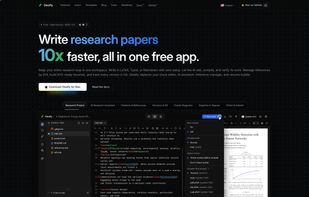
Local-first desktop app for scientific writing in LaTeX, Typst, and Markdown supporting side-by-side editing and PDF preview, offline AI-assisted workflows, versioning via Git, citations, compiling, GitHub sync, and fully open-source, cross-platform performance.

Cost / License
- Free
- Open Source (AGPL-3.0)
Application type
Platforms
- Mac
- Windows
- Linux


Features

Oleafly News & Activities
Highlights All activities
Recent activities
- Vyom Mengar liked Oleafly
- Andre Schmidt liked Oleafly
- Ben liked Oleafly
Love this! What I like most about Oleafly is its local-first approach and support for LaTeX, Typst, and Markdown in one place. The side-by-side PDF preview, citation support, and Git integration are a thoughtful combination for scientific writing. Being open source and supporting offline work makes it especially appealing.
- Prajwal-Murthy A comment was removed from Oleafly
- Madhu-5320 liked Oleafly
 Serkan-BALLI added Oleafly as alternative to LaTeX Editor
- sQuilloIII liked Oleafly


Oleafly information
Developed by
 Oleafly
 Licensing
Open Source (AGPL-3.0) and Free product.Written in
Alternatives
56 alternatives listedBadge
Get an embeddable badge for OleaflySupported Languages

AlternativeTo Categories
Education & Reference, AI Tools & ServicesGitHub repository
- 194 Stars
- 20 Forks
- 18 Open Issues
- Updated


Comments and Reviews
Love this! What I like most about Oleafly is its local-first approach and support for LaTeX, Typst, and Markdown in one place. The side-by-side PDF preview, citation support, and Git integration are a thoughtful combination for scientific writing. Being open source and supporting offline work makes it especially appealing.