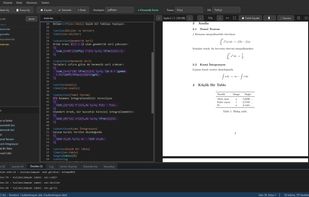
LaTeX Editor is a free and open source desktop editor for LaTeX documents,
built with PyQt6. It puts the source and a live PDF preview side by side:
save, and the document recompiles and the preview refreshes on its own,
scrolling to wherever your cursor was.
SyncTeX works in both directions. Ctrl+click a line in the source and the PDF
jumps to it, even across pages; Ctrl+click in the PDF and you land back on the
source line.
Ctrl+K takes a named snapshot of the entire project. It requires no git
knowledge, but writes a standard .git repository using embedded dulwich, so
the history stays readable by ordinary git tools. A Version History tab shows
differences between snapshots and can restore a single file from an older one.
The engine is detected from the document: it honours a % !TEX program
directive, and otherwise chooses lualatex for fontspec, xelatex for
mathspec/xeCJK, and pdflatex for inputenc/fontenc. Compiler errors and
warnings land in their own panels, and clicking one jumps to the line.
Recurring errors also get a plain-language hint instead of the raw log text.
Other features: % !TEX root for multi-file projects, a table wizard that
builds tabular blocks from typed cells or a CSV, document outline, folder-wide
search, drag and drop images into figure blocks, PDF text search and selection,
PDF bookmarks, dual page view, and 7 themes. The interface is available in
English and Turkish.
The application ships the GUI only; a TeX distribution is installed separately
(TeX Live via apt on Linux, mactex on macOS and via WSL on Windows).
Spell checking is built in and LaTeX aware: it skips the preamble, reads
accent macros as the letter they produce, checks \section and \caption
arguments as prose but not \label or \cite, and leaves URLs, DOIs and
bibliography keys alone. Turkish and English dictionaries ship inside the
application, so nothing is downloaded, and a document that mixes two
languages can be checked against a second dictionary.
Licensed GPL-3.0. Available as a portable Windows executable and a Linux
AppImage.







 Serkan-BALLI added LaTeX Editor as alternative to Overleaf, TeXstudio, Texmaker, TeXworks and 4 more
 Serkan BALLI


No comments or reviews, maybe you want to be first?