Microsoft To Do AlternativesOnly apps categorised as Task Management Tools - Page 18

The best Task Management alternative to Microsoft To Do is Super Productivity, which is both free and Open Source. If that doesn't suit you, our users have ranked more than 100 alternatives to Microsoft To Do and loads of them are Task Management Tools so hopefully you can find a suitable replacement. Other interesting Task Management Tool alternatives to Microsoft To Do are Notion, Todoist, TickTick and Workflowy.

filter to find the best alternatives

Most Microsoft To Do alternatives are Task Management Tools, but you can also narrow the list to Todo List Managers or Note-taking Tools. Other popular filters are Open Source, Free, Linux and EU. You can also filter for EU-based alternatives if you prefer software from the European Union.
Copy a direct link to this comment to your clipboard
Alternatives
Microsoft To Do alternatives page was last updated

Alternatives list

  1. Making Today icon
     1 like

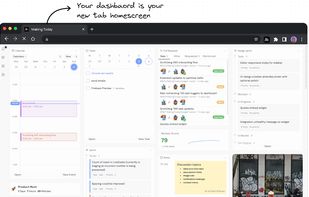
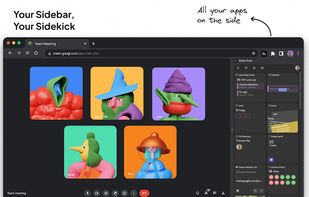
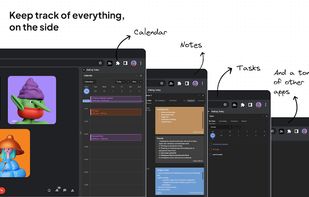
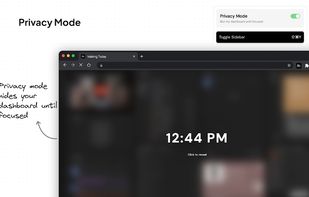
    Making Today is your command centre to get things done. Create dashboards to manage any part of your life, whether it's work, a side project, an upcoming trip, or just staying focused. Making Today helps you organise all your stuff in one place: calendar events, meetings...

    Cost / License

    • Freemium (Subscription)
    • Proprietary

    Application type

    Since

    • Since 2025

    Platforms

    • Windows
    • Mac
    • Linux
    • Google Chrome
    • AE flagUnited Arab Emirates
    Making Today screenshot 1
    Good alternative?
     
  2. Turns synced personal task lists into shared department boards, keeping titles, notes, due dates and completion states aligned both ways. Adds assignees, @mention comments, roles, labels, recurring tasks, templates, dependencies, reporting, and calendar views.

    Cost / License

    • Freemium (Subscription)
    • Proprietary

    Application type

    Since

    • New

    Platforms

    • Online
    Good alternative?
     
  3. Web-based time and priority planner that puts tasks, delegated items, meeting follow-ups and goal steps on one A/B-ranked page per day. It separates main, outside and due-from-others work, supports recurring tasks, attachments and time estimates, and works alongside a linked Google or Microsoft calendar.

    Cost / License

    • Subscription
    • Proprietary

    Application type

    Since

    • New

    Platforms

    • Online
    • Software as a Service (SaaS)
    Good alternative?
     
  4. Task capture app with keyword-based sorting. Solves: forgetting tasks because capturing them requires too many steps (opening different apps, selecting lists).

    Cost / License

    • Freemium (Subscription)
    • Proprietary

    Application type

    Since

    • Since 2026 (updated Mar 2026)

    Platforms

    • Android
    • iPhone
    Good alternative?
     
  5. Paso icon
     Like

    Stay organized with a visual timeline that handles planning, note-taking, and tracking for personal and work projects. Merge tasks, goals, and unstructured ideas, manage long-term progress, avoid clutter, and clarify priorities across all aspects of life.

    Cost / License

    • Freemium (Subscription)
    • Proprietary

    Application type

    Since

    • Since 2026 (updated Apr 2026)

    Platforms

    • Mac
    • Online
    • Android
    • iPhone
    Good alternative?
     
  6. Pomodoist icon
     Like

    Open-source task manager linking projects, tags, priorities, due dates, voice capture, and a built-in Pomodoro timer. Start sessions from tasks, track focus time in reports, sync across devices and web, connect Google Calendar, or work locally without an account.

    Cost / License

    Application type

    Since

    • New

    GitHub

    • GitHub stars: 453

    Platforms

    • Mac
    • iPhone
    • iPad
    Good alternative?
     
  7. YNO icon
     1 like

    YNO is a clean and minimal todo list designed for clarity, focus, and daily productivity. It helps you track tasks using a simple Yes / No system - without complex planning or overload.

    Cost / License

    • Free
    • Proprietary

    Application type

    Since

    • Since 2025

    Platforms

    • Google Chrome
    Good alternative?
     
  8. WhatNext icon
     Like

    WhatNext helps you prioritize tasks without dates or durations. Simply choose a size and urgency for each task, and we'll order them automatically.

    Cost / License

    • Subscription
    • Proprietary

    Application type

    Since

    • Since 2026

    Platforms

    • Android
    • GB flagUnited Kingdom
    WhatNext screenshot 1
    WhatNext screenshot 3
    +2
    WhatNext screenshot 4
    Good alternative?
     
  9. The task manager for people who hate task managers. Keyboard-first, zero bloat, and built for developers who just want to ship.

    Cost / License

    • Freemium (Subscription)
    • Proprietary

    Application type

    Since

    • Since 2026

    Platforms

    • Online
    • Software as a Service (SaaS)
    Good alternative?
     
  10. An intuitive and effective to-do list app to help you stay organized and manage tasks with ease.

    Cost / License

    • Freemium (Subscription)
    • Proprietary

    Application type

    Since

    • Since 2025 (updated Dec 2025)

    Platforms

    • iPhone
    • iPad
    Good alternative?
     
  11. TusGleich icon
     Like

    A focused task management app that helps you organize tasks and routines, prioritize what needs to be done today, and keep track of your progress.

    Cost / License

    • Freemium (Subscription)
    • Proprietary

    Application type

    Since

    • New

    Platforms

    • Windows
    • Mac
    • Online
    • Android
    • iPhone
    • iPad
    • Android Tablet
    Good alternative?
     
  12. Nodoo icon
     Like

    A keyboard-first task manager that blends seamlessly into your macOS and iOS workflow. Native, blazing fast, and completely secure.

    Cost / License

    • Free
    • Proprietary

    Application type

    Since

    • New

    Platforms

    • Mac
    • iPhone
    • iPad
    Good alternative?
     
You are at page 18 of Microsoft To Do alternatives