Todoist icon
Todoist icon

Todoist

 455 likes

Organizes tasks efficiently with quick add scheduling, 60+ tool integrations, advanced language recognition for recurring tasks, and platform compatibility. It offers project templates, visual task priorities, and personalized productivity insights.
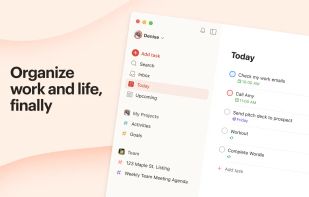
Todoist screenshot 1

Cost / License

  • Freemium (Subscription)
  • Proprietary

Application type

Since

  • Since 2009

Updated

  • Updated Nov 2026

Platforms

  • Windows
  • Mac
  • Linux
  • Chrome OS
  • Online
  • Android
  • iPhone
  • iPad
  • Android Tablet
  • Apple Watch
455likes
Save

Features

Properties

Integrations

Features

Highlights All activities

Todoist News & Activities

Recent News

Recent activities

Comments and Reviews

   
Comment summary: Todoist earns praise for its clean, fast, cross-platform interface, natural-language task entry, recurring tasks, gamification, collaboration, integrations—especially Google Calendar—and useful organization features. Users consistently criticize weak keyboard-only navigation, limited bulk actions and customization, missing or inconvenient export/import, and a shrinking free tier that restricts reminders, projects, filters, and other features. Several also consider Premium expensive for its pace of feature development.
Top Negative Comment
microdosingwikipedia
3

It's disappointing how limited even the Pro subscription feels in many areas. Several features that simply seem necessary for productivity which can be found in other (unnamed) apps are lacking or missing entirely on Todoist.

  • For someone who works & goes to college, being able to color code my schedule by work/personal/each school subject makes life much easier. Todoist only has the ability to color code based on priority - this can work in place of custom color coding if you only need 4 colors, which is not the case for me.
  • It also lacks the ability to change your default task length - everything is 30 minutes unless you click into the date/time & adjust it or specify it in the title (by adding "for 1 hour" or "from 3-4pm").
  • Adjusting the date/time/length of tasks in the calendar view is often a struggle because it lacks some responsiveness - after making a change, a task will sometimes revert back to it's previous date/time/length and the change has to be made again (assuming you realized that it reverted back).
  • There's also no option to leave completed tasks in sight & just checked off or crossed out - tasks disappearing might be ideal for some, but for those of us who regularly need to look back at past tasks, it's a hassle to go hunt them down.
  • As in most households, I (the wife) am the schedule wrangler, so I have all kinds of things on my schedule, including my husband's appointments (because otherwise, they'll be forgotten & missed), vet visits for our cats, service appointments for our cars, etc. Either I haven't figured out this function, or it's just severely lacking -- but I'm able to share the calendar with my husband, and that's about it. If I assign a task to him so he gets a reminder, it won't show the task on my calendar so I can keep track of everything (and physically remind him if he seems to have forgotten or ignored the reminder from the app). I can't assign it to two people so that we both get reminders & it shows on both calendars. If I leave it unassigned, he doesn't get a reminder for the task, and it doesn't seem like he's able to do much with it.
  • All the available templates were initially a feature that drew me in, but ended up not being as useful as I expected.
  • The decent length of integrations was also appealing, but the ones that I tried just didn't function properly.
Most Recent Comment
spacedrepetition
0

I no longer use todo apps out of my work, but I have been a user of Todoist for a few years. It remains one of my examples of well-designed software that you can put in all hands.

Steve Croce
0

Love Todoist and use it daily, but I really wish it had more calendar integrations

Review from a new or low-activity account — shown here, but not counted in the app rating.
Joshua Weber
1
Designer at Kizuna Collective

Two things keep me here. Quick capture in plain language, so a task takes three seconds instead of thirty. And shared projects that actually work. My wife and I keep household and business tasks in the same system and updates from either side just show up, no syncing conversation required. The free tier has thinned out over the years and filters being paid still feels off, but I pay for it and do not regret that.

Review from a new or low-activity account — shown here, but not counted in the app rating.
Ivo Gospodinov
1
builder / founder at northr ai

Todoist works really well for managing personal task lists and recurring to-dos.

If someone is looking for less task volume and more clarity around what actually matters each day or week - especially in a team context-tools like northr.ai approach the problem from a different angle, focusing on priorities and alignment rather than lists.

Review from a new or low-activity account — shown here, but not counted in the app rating.
Maxiaid
0
NEET AF

Use SuperProductivity instead.

0

Use https://apps.microsoft.com/detail/xp99k37g9cwbdc?hl=en-US&gl=US for download. Nice that you can load images in comments, but I'd like a note area. Tasks can be shifted around. Calendar view costs money. You might try Elisi: Digital Bullet Journal for calendar view etc Elisi: Digital Bullet Journal Todoist has lots of notification types, and they're on by default, so you might want to set that.

7 of 26 comments

Featured in Lists

My Setup - All Apps and Software

Master List of all Apps and Software I use for both work and personal life.
By Jimmy Briggs416 appsUpdated

A Software Engineer Work Essentials

An up to date list of what I need in order to do my job.
By lupuleasai63 appsUpdated

ALL Chrome web extensions (applicable to Opera, Vivaldi, YandexBrowser too)

A list with 144 apps by Nemets39 without a description.
By Nemets39144 appsUpdated

Official Links

Page may contain affiliate links. Affiliate links never affect ranking.

Install from the command line

  • winget install -e --id Doist.Todoist
  • brew install --cask todoist-app
  • flatpak install flathub com.todoist.Todoist

Be careful what you paste into a terminal. Check what a command installs before running it.

What is Todoist?

Todoist is a task management tool that organizes daily activities efficiently and user-friendly. It is compatible with 13 different platforms and devices, allowing task management from anywhere.

Todoist's features include a Quick Add option for immediate task scheduling, advanced language recognition for setting recurring tasks, and accessibility from any device. It integrates with your calendar, voice assistant, and over 60 tools like Outlook, Gmail, and Slack.

For team projects, Todoist enables task assignments with options for comments, voice notes, and file attachments. It offers project templates for various needs, and users can set visual task priority levels. Todoist also provides insights into personalized productivity and task planner trends.tsnap

Todoist Videos

Todoist information

  • Developed by

    US flagDoist
  • Licensing

    Proprietary and Freemium product.
  • Pricing

    Subscription ranging between $4 and $6 per month + free version with limited functionality.
  • Rating

    Average rating of 3.6 (25 ratings)
  • Alternatives

    417 alternatives listed
  • News

    5 news articles related to Todoist
  • Badge

    Get an embeddable badge for Todoist
  • Supported Languages

    • English
    • Czech
    • Danish
    • Dutch
    • Finnish
    • French
    • German
    • Italian
    • Japanese
    • Korean
    • Norwegian Bokmål
    • Polish
    • Portuguese
    • Russian
    • Chinese
    • Spanish
    • Swedish
    • Turkish

AlternativeTo Categories

Office & Productivity, Remote Work & Education

Apple AppStore

  •   Updated 
  •   4.8 avg rating
View in AppStore

Our users have written 26 comments and reviews about Todoist, and it has gotten 455 likes.

Todoist was added to AlternativeTo by Ola Johansson on and this page was last updated .