


MenuBar Stats
1 like
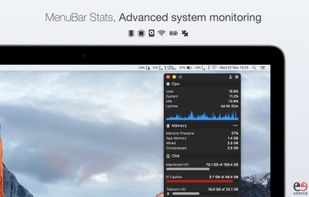
Offers modular monitoring of CPU, Memory, Network, Disk, Battery, GPU, Bluetooth, Temperature, and Fans, each configurable and reorderable, with menu bar integration, notifications for low battery or storage, keyboard shortcuts, and color theme adaptation.

Cost / License
- Pay once
- Proprietary
Application typeApplication types
Alerts
- Discontinued
Platforms
- Mac


Discontinued
The app seems no longer updated. Last version, 3.9, released in November 2023, can be still downloaded from the Appstore

Features
Highlights All activities
MenuBar Stats News & Activities
Recent activities
 Danilo Venom added MenuBar Stats as alternative to Vitals for macOS
 Vitals added MenuBar Stats as alternative to Vitals Activity Monitor
 airstats added MenuBar Stats as alternative to AirStats
 DanielDinu added MenuBar Stats as alternative to MacMetra
- Quite-Velocity added MenuBar Stats as alternative to Task Manager for macOS
- Paul added MenuBar Stats as alternative to ActivityLine
 getapps added MenuBar Stats as alternative to RobuStats
 Kevin Stam added MenuBar Stats as alternative to PerformanceMonitor
 zxkmm added MenuBar Stats as alternative to SafeFanControl
 Paul added MenuBar Stats as alternative to MenuBarMonitor


Developed by
Fabrice LeyneLicensing
Proprietary and Commercial product.Pricing
One time purchase (perpetual license) that costs $5.Alternatives
33 alternatives listedBadge
Get an embeddable badge for MenuBar StatsSupported Languages


No comments or reviews, maybe you want to be first?