





MenuBarMonitor
Like
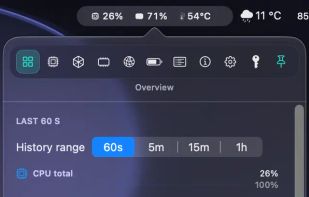
Live CPU, GPU, RAM, and thermal data directly in your macOS menu bar. Native for Apple Silicon, private by design, and built for fast first-glance insight.

Cost / License
- Pay once
- Proprietary
Application type
 EU
EUPlatforms
- Mac


Features
Highlights All activities
MenuBarMonitor News & Activities
Recent activities
 Danilo Venom added MenuBarMonitor as alternative to Vitals for macOS
 Vitals added MenuBarMonitor as alternative to Vitals Activity Monitor
- Quite-Velocity added MenuBarMonitor as alternative to Task Manager for macOS
 Paul added MenuBarMonitor as alternative to Lifespan
 Paul added MenuBarMonitor as alternative to HWiNFO (32/64), Stats, MSI Afterburner, Open Hardware Monitor and 47 more
- Paul added MenuBarMonitor


Developed by
 Nico Sagolla
 Licensing
Proprietary and Commercial product.Pricing
One time purchase (perpetual license) that costs $15.Alternatives
55 alternatives listedBadge
Get an embeddable badge for MenuBarMonitorSupported Languages


No comments or reviews, maybe you want to be first?