


T
Task Manager for macOS
Like
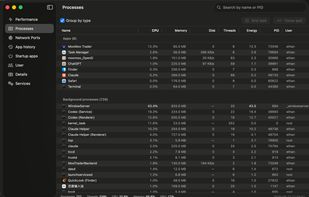
A Windows 11 Task Manager–style system monitor for macOS — processes, CPU/memory/GPU/disk/network, listening ports, startup items and services, with no password and no permission prompts.

Cost / License
- Free
- Open Source (MIT)
Platforms
- Mac


Features
Highlights All activities
Task Manager for macOS News & Activities
Recent activities
- Danilo Venom added Task Manager for macOS as alternative to Vitals for macOS
- Vitals added Task Manager for macOS as alternative to Vitals Activity Monitor
- Quite-Velocity added Task Manager for macOS
- Quite-Velocity added Task Manager for macOS as alternative to Process Explorer, Mission Center, Stats, iStat Menus and 31 more
Developed by
UnknownLicensing
Open Source (MIT) and Free product.Written in
Alternatives
37 alternatives listedBadge
Get an embeddable badge for Task Manager for macOSSupported Languages

AlternativeTo Categories
System & Hardware, OS & Utilities, Office & Productivity, Network & AdminGitHub repository
- 0 Stars
- 0 Forks
- 0 Open Issues
- Updated


No comments or reviews, maybe you want to be first?