




Stats
59 likes
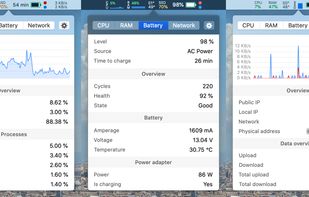
Menu bar tool for macOS shows real-time CPU, GPU, memory, disk, network, battery status, sensor data, fan speed, Bluetooth device info, multi-time zone clocks, customizable widgets, and historical graphs while ensuring privacy.

Cost / License
- Free
- Open Source (MIT)
Application type
Platforms
- Mac

Features
Stats News & Activities
Highlights All activities
Recent News
No news, maybe you know any news worth sharing?
Share a News Tip
Recent activities
 Danilo Venom added Stats as alternative to Vitals for macOS
 Vitals added Stats as alternative to Vitals Activity Monitor
I like it. It just sits in the menu bar and I can click on it to check on my system.
- ElectricSquirrel42 liked Stats
 SalarFarahani added Stats as alternative to Wokyintosh
- Quite-Velocity added Stats as alternative to Task Manager for macOS
- Paul added Stats as alternative to ActivityLine


Featured in Lists


The macOS setup for everyone (with freeware only)
THIS LIST HAS BEEN DELETED DUE TO A BUG, SO IT MISSES SOME HONORABLE MENTIONS !
This is the apps for macOS that I would recommend to anyone who just got a Mac !
Some are the default that Apple offers but I tried to offers you free alternative to escape Apple Wall Garden if you need or want to
The same list for
Windows 10 & Windows 11 :
Linux kernel (GUI apps only) :


Free Setapp Alternatives
A list of applications that are free alternatives to applications found in the Setapp subscription.


Mac Must Haves
Just a list in case I lose my other lists within my local storage :)
What is Stats?
Stats information
Developed by
 Serhiy Mytrovtsiy
 Licensing
Open Source (MIT) and Free product.Written in
Rating
Average rating of 4.4Alternatives
65 alternatives listedBadge
Get an embeddable badge for StatsSupported Languages

AlternativeTo Categories
OS & Utilities, System & HardwareGitHub repository
- 42,276 Stars
- 1,557 Forks
- 30 Open Issues
- Updated


Comments and Reviews
i just want the average cpu temp. i'm unable to display just 1 number in the menu bar.
Beatiful App! But, heavily loads cpu -> fast discharge.
I like it. It just sits in the menu bar and I can click on it to check on my system.
Stats is a fantastic FOSS tool that allows you to monitor system stats from the menu bar. It does everything more expensive proprietary software can do, so what's not to love?
Monitors system and hardware stats. It's open source.
Offers a lot of different monitoring tools for Mac OS and is much simpler to use compared to the Mac OS default (Activity Monitor). I am concerned however as to why values may be a little lower on Stats compared to the default app. Also does miss a couple of other things premium apps in this space offer but its free so I cant complain much.
Lets us monitors and then control.