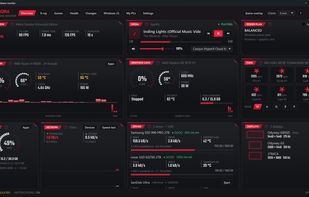
Aurora is a free hardware monitor for Windows 10 and 11. It shows temperatures, fans, drives, network and in-game FPS live on one dashboard, and explains in plain words whether the PC is doing well, what to do and what changed.
The Health tab lists only what is wrong, most serious first: drive wear (SMART), a fan or pump giving up, a weak BIOS battery, the hardware errors and blue screens that Windows logs silently, and build mistakes such as a display plugged into the motherboard instead of the graphics card. The Changes tab notes what changes on the PC (software, drivers, Windows updates, startup programs, BIOS) and measures the effect of each change on games, temperatures and startup time.
For games, Aurora keeps every session (average FPS, 1% low) and shows an in-game overlay that tells what limits the FPS live: the graphics card, the processor or an FPS cap. The X-ray tab draws the PC with its real fans and airflow, and offers fan modes and a three-minute cooling test. The Windows tab explains pending Windows updates with advice, changes settings only when asked (each one can be restored in one click), and frees up space safely: duplicate files and old temporary files go to the Recycle Bin.
It also prepares a report for whoever helps remotely, sends files between the PCs at home (encrypted, never through the Internet) and offers a plugin for the Elgato Stream Deck. No account, no ads, and no readings are sent. Aurora is available in English and French, written in Rust, and its installer is digitally signed. Five themes are included; optional paid skins change its look, and every feature stays free.







 Paul added Aurora Hardware Monitor as alternative to HWiNFO (32/64), Libre Hardware Monitor, GPU Screen Recorder, MSI Afterburner and 47 more
 Denis
Denis 

No comments or reviews, maybe you want to be first?