

DeepClean
3 likes
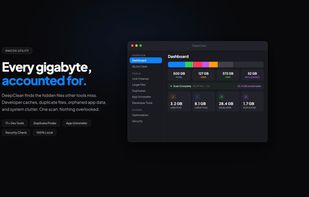
A native macOS disk cleaner that finds the clutter other cleaners miss — duplicates, developer caches, leftover app data, and large forgotten files.
Features
Properties
- Privacy focused
- Lightweight
Features
- Duplicate File Finder
- No Tracking
- System Tweaker
- Works Offline
- Delete Temporary Files
- Ad-free
- Portable
- Dark Mode
- Memory Optimization
- Software Uninstallers
DeepClean News & Activities
Highlights All activities
Recent activities
- Yong_Park reviewed DeepClean
Such a powerful and easy to use tool, saved me about 27Gb+ Will you be adding support for iOS as well?
- Jimmy_Grey A comment was removed from DeepClean
- anuraj-0 updated DeepClean
- anuraj-0 liked DeepClean
- anuraj-0 added DeepClean
anuraj-0 added DeepClean as alternative to CCleaner, Canta, AppCleaner and Mole
DeepClean information
What is DeepClean?
DeepClean is a native macOS disk cleanup utility that goes beyond surface-level cache clearing. It scans the entire disk and surfaces what is actually consuming space, then lets the user review every item before anything is deleted.
Categories of clutter DeepClean detects:
- System and application caches in ~/Library/Caches and ~/Library/Logs
- Temporary files in /tmp and /var/folders
- Browser caches across Safari, Chrome, Firefox, Edge, Brave, Arc, and Opera
- Duplicate files detected by content hash, with side-by-side preview
- Large files sorted by size, age, and last-accessed date with QuickLook preview
- Leftover data from uninstalled apps (orphaned support files, preferences, launch agents)
- Developer artifacts: Xcode derived data, simulators, archives, node_modules, Python virtual environments, Docker images and volumes, Homebrew, Gradle and Maven caches, JetBrains and VS Code caches, HuggingFace and PyTorch model caches
- iOS device backups in MobileSync
- Installer files (.dmg, .pkg, .iso, .xip) sitting in Downloads
- Broken symlinks and empty folders
Safety features:
- Every item has a confidence rating (Safe, Review, Caution) based on UTI and path classification
- Files move to the Trash, not permanent deletion, so anything can be restored
- Pre-deletion verification confirms each file still exists and matches before removing it
- Exclusion lists let users protect specific files, folders, or apps
Other features:
- Per-app storage breakdown including caches and support files
- Scan cache so the app shows results instantly on relaunch instead of re-scanning
- Menu bar widget with current disk status
- Dark mode and light mode
Privacy:
- All processing happens on the Mac. No data is uploaded.
- No analytics, no telemetry, no account required.
Distribution:
- Direct download from the developer
- Not available on the Mac App Store because Full Disk Access is required to scan ~/Library.
Pricing is a one-time purchase, no subscription.


Comments and Reviews
Such a powerful and easy to use tool, saved me about 27Gb+ Will you be adding support for iOS as well?
