Disk Map shows what’s filling your Mac and helps you safely free up space.
See where your space goes
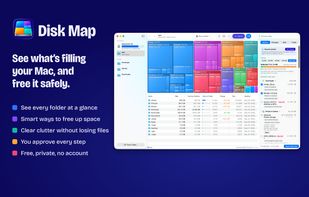
• Every folder as a map, sized by the space it takes. Click to go inside
• A sortable list beside it, and search by name
• What grew since your last scan
• Space by kind of file: videos, photos, apps, archives and more
• The space macOS keeps for itself: snapshots, swap and purgeable space
Free the space you need
• Pick a goal, and the Space Advisor suggests the safest ways to reach it
• Nothing lost first: cloud files kept online only, duplicates merged, the Trash emptied
• Then caches and installers your apps can rebuild or download again
• Your own photos and documents are never picked for you
• Every suggestion says why it’s safe
• Nothing happens until you press Apply, and anything moved to the Trash can be put back
Know what deleting really frees
• On APFS, copies share their data, so deleting one can free far less than its size
• Disk Map shows both: the space a folder takes and what deleting it gives back
And more
• Suggestions appear while the scan is still running
• Ask AI: send a summary of names and sizes (never file contents) to the AI chat you already use
• Free space in the menu bar, with an optional warning before your disk fills up
• Quick Look, Show in Finder and full keyboard navigation
Private by design
• No account, no analytics, no tracking
• Everything Disk Map finds stays on your Mac







 Arek-Sredzki added Disk Map as alternative to WizTree, Baobab Disk Usage Analyzer, Filelight, SD Maid SE and 49 more


 Vikom Media

No comments or reviews, maybe you want to be first?