Sweep finds the junk, big files and forgotten leftovers filling your Mac, checks it for malware and risky settings, keeps every app up to date, and shows you what your Mac does while you're not looking. It's a native SwiftUI app, it runs entirely on your Mac, and nothing is ever removed until you've reviewed it.
Features:
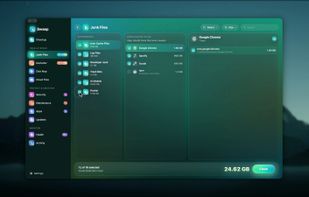
Junk Files: gigabytes back, safely
- App and system caches, logs and crash reports, the Trash, old iPhone backups and downloaded installers.
- Developer junk: Xcode DerivedData, simulators, device support files, package manager caches.
- Local AI models from Ollama, LM Studio and Hugging Face, including the same model kept twice by two apps.
- Docker: build cache, unused images and stopped containers, cleaned with Docker's own commands. Volumes are never touched.
- Review every category, group and file before anything goes. Junk can go to the Trash instead (Settings).
Disk Map: see where your space went
- A live bubble map of any disk or folder. Bigger bubble, bigger folder; each shows its share at a glance.
- Hover for details, double-click to open a folder, tick anything to remove it with a full removal log.
- What Grew: every scan is remembered, so the next one shows what grew and narrows it down to the folder that explains it.
- System Data, explained: what macOS counts as System Data on your Mac, who looks after each part, and where to act.
Apps: uninstall completely, catch what's left behind
- Remove any app together with the caches, preferences and support files it spread around.
- Drag an app to the Trash and Sweep finds what it left behind, ready to review.
- Find leftovers of apps you deleted long ago, and apps you haven't opened in months.
- Rosetta check: spot Intel-only apps that will stop opening once Rosetta goes away.
Updates: every app in one list
Updates from each app's own update feed (signature checked), the App Store and Homebrew, in one list. Update All asks before quitting open apps and reopens them afterwards. Release notes, skip a version, or ignore an app.
Health: a live score with reasons
- A transparent 0–100 health score with recommendations that open the right page.
- Live CPU, memory, disk, battery and network readings with sparklines.
- Battery Care: health, cycles and the charge limit macOS applies.
- Drive Health from the SSD's own health log (life left, data written, temperature, errors), plus a real drive speed test.
- Security checklist: FileVault, firewall, Gatekeeper, SIP, automatic updates, XProtect's age, password after sleep and backups, each with a fix.







 Paul added Sweep for Mac as alternative to CCleaner, Kudu, Mole, Canta and 47 more


 Amar Singh


No comments or reviews, maybe you want to be first?