
Purge icon
Purge icon

Purge

 Like

Free up your Mac, safely. Clears the cache and junk it piles up on its own. Open source, and everything goes to the Trash, so nothing is ever lost.
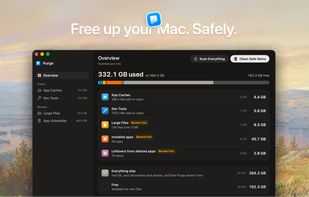
The Overview screen shows how much space is used and splits it into app caches, dev tools, large files, apps and leftovers, with safe items ready to clean in one click.

Cost / License

  • Free
  • Open Source (MIT)

Application type

Platforms

  • Mac  Requires macOS 13 Ventura or later
0likes
0articles
Save

Features

Properties

  1.  Privacy focused

Features

  1.  No registration required
  2.  Works Offline
  3.  Delete Temporary Files
  4.  Ad-free
  5.  Dark Mode
  6.  No Tracking
Highlights All activities

Purge News & Activities

Recent activities

Purge information

AlternativeTo Category

OS & Utilities

GitHub repository

  •  1,093 Stars
  •  57 Forks
  •  17 Open Issues
  •   Updated  
View on GitHub

Popular alternatives

View all
Purge was added to AlternativeTo by Jithin-Sabu on and this page was last updated .

No comments or reviews, maybe you want to be first?

Official Links

What is Purge?

Purge is a free, open-source Mac cleaner that frees up space without risking your files. Everything it removes goes to the Trash first, so you can put it back if you change your mind.

It clears app caches, Xcode derived data and other developer tool junk, and the leftovers apps leave behind when you remove them. It also finds large files and duplicates for you to review. One-click and scheduled cleans only touch items marked Safe to clean. Anything that needs a closer look, like Docker's data folder, is marked Check First and never removed automatically.

Each item comes with a plain explanation of what it is and what happens if you remove it. Purge is MIT licensed, so anyone can read the code on GitHub. There are no subscriptions, no ads and no account. It runs on macOS 13 Ventura and later, and you can install it from purgemac.com or GitHub.
