
DiskFox icon
DiskFox icon

DiskFox

DiskFox keeps a history of your Mac's storage, so it can show what grew, when and why.
DiskFox screenshot 1

Cost / License

  • Pay once
  • Proprietary

Platforms

  • Mac  Requires macOS 14 Sonoma or later. Apple silicon and Intel.
0likes
0articles
Save

Features

Properties

Features

Highlights All activities

DiskFox News & Activities

Recent activities

DiskFox information

DiskFox was added to AlternativeTo by Krishan-Assi on and this page was last updated .

No comments or reviews, maybe you want to be first?

What is DiskFox?

DiskFox is a Mac storage app that keeps a history.

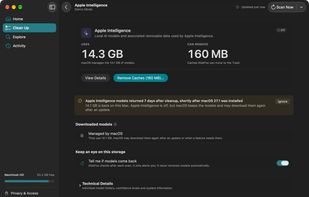
Disk analysers show you what's big right now. DiskFox saves each scan on your Mac and compares it with the last one, so it can tell you what grew, when it happened, and the likely cause: Apple Intelligence models downloading after a macOS update, a new Xcode simulator runtime, or a cache that keeps coming back.

What it does:

  • What Changed: dated changes such as "Developer data grew 9.7 GB since Wednesday", with the cause in plain words. When macOS can't confirm a cause, DiskFox says "likely" rather than guessing.
  • Storage Trends: a graph of every scan, with your cleanups marked on it.
  • Explains System Data: Time Machine local snapshots, purgeable space, Apple Intelligence, Xcode and developer caches, app caches and 60+ other known storage hogs, each listed separately.
  • Tells you when something you cleaned comes back.
  • Largest files, real app sizes (including their data and caches) and an exact duplicate finder.
  • A menu-bar panel showing free and purgeable space.

Careful by design: nothing is removed without a review that says what each item is and whether it will come back. Everything goes to the Trash first, and there's a cleanup history with Put Back. No account, no analytics.

Free 14-day trial with no card, then $9.99 once for 2 Macs. macOS 14 or later, Apple silicon and Intel. Signed and notarised by Apple.
