Apps tagged with 'traffic-shaper'

All apps in Apps tagged with 'traffic-shaper' category. Use the filters below to narrow down your search. 
Copy a direct link to this comment to your clipboard
  1. pfSense icon
     112 likes

    pfSense is a free and open source firewall and router that also features unified threat management, load balancing, multi WAN, and more.

    Cost / License

    Application types

    Platforms

    • BSD
    Dashboard page
    pfSense screenshot 1
    pfSense screenshot 2
    +2
    pfSense screenshot 3
    30 alternatives
    4.2
    Very Good6 ratings
  2. NetLimiter icon
     94 likes

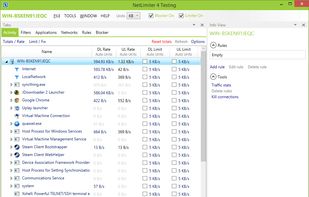
    An advanced Windows tool for internet traffic control and monitoring. Set speed limits for apps and connections, with real-time and long-term stats.

    Cost / License

    • Paid
    • Proprietary

    Application types

    Platforms

    • Windows
    NetLimiter screenshot 1
    Dark Theme
    29 alternatives
    4.0
    Very Good9 ratings
  3. cFosSpeed icon
     39 likes

    cFosSpeed is a network driver, which attaches itself to existing Internet connections. It then optimizes data transfer by means of Traffic Shaping. This software is designed to achieve maximum performance of your Internet connection so you take advantage of it when browsing and...

    Cost / License

    • Paid
    • Proprietary

    Platforms

    • Windows
    Main window = Settings
    11 alternatives
  4. BWMeter icon
     6 likes

    BWMeter is a powerful bandwidth meter, monitor, traffic controller and firewall, which measures, displays and controls all traffic to/from your computer or on your network. Unlike other products, it can analyze the data packets (where they come from, where they go, which port...

    Cost / License

    • Paid
    • Proprietary

    Alerts

    • Discontinued

    Platforms

    • Windows
    Main Window
    Options
    47 alternatives
  5. ZeroShell icon
     8 likes

    Zeroshell is a Linux distribution for servers and embedded devices aimed at providing the main network services a LAN requires. It is available in the form of Live CD or Compact Flash image and you can configure and administer it using your web browser.

    Cost / License

    • Free
    • Open Source

    Application types

    Alerts

    • Discontinued

    Platforms

    • Linux
    • Self-Hosted
    ZeroShell screenshot 1
    ZeroShell screenshot 1
    ZeroShell screenshot 2
    10 alternatives
  6.  2 likes

    WIPFW is a MS <span style="color:black;background-color:silver;font-weight:bold;">Windows</span> operable version of IPFW for FreeBSD OS. You can use the same functionality and configure it as only you work with IPFW.

    Cost / License

    • Free
    • Open Source

    Platforms

    • Windows
    WIPFW screenshot 1
  7. L7 Filter icon
     3 likes

    L7-filter is a classifier for Linuxs Netfilter that identifies packets based on application layer data. It can classify packets as Kazaa, HTTP, Jabber, Citrix, BitTorrent, FTP, Gnucleus, eDonkey2000, etc., regardless of port.

    Cost / License

    • Free
    • Open Source

    Platforms

    • Linux
    6 alternatives
  8. Slowy icon
     1 like

    Slowy is an OSX app which simulates custom connection's conditions and limits the network traffic. It is created for web developers that work on a local server, to test a website with a real-world connection.

    Cost / License

    • Freemium
    • Proprietary

    Platforms

    • Mac
    Dropdown menu
    Preference window with custom presets
  9. Throttlr icon
     2 likes

    Throttlr is a native macOS utility that shows which apps and signed background services are using your network connection, then lets you control their bandwidth individually.

    Cost / License

    • Freemium
    • Proprietary

    Application types

    Platforms

    • Mac
    Throttlr's main dashboard shows live upload and download speeds for every app, with quick controls for throttling and blocking network traffic.
    Set separate upload and download speed limits for an individual app, or block its traffic when a complete stop is needed.
    Bandwidth limits take effect instantly while the dashboard continues to display each app's current network activity in real time.
    +1
    Track recent upload and download activity over time to identify bandwidth spikes and see how active limits affect network usage.
    4 alternatives