GIMP AlternativesOnly apps from the EU

The best alternative to GIMP is Krita, which is both free and Open Source. If that doesn't suit you, our users have ranked more than 100 alternatives to GIMP and many of them are so hopefully you can find a suitable replacement. Other interesting alternatives to GIMP are Photopea, PixiEditor, LazPaint and PhotoFiltre.

filter to find the best alternatives

GIMP alternatives are mainly Image Editors, but if you're looking for Digital Painting Tools or Photo Editors you can filter on that. Other popular filters include iPad + Free, Linux, iPad, Android, Android + Free, iPhone and Mac. You can also filter by region, for example EU-based alternatives if you prefer software developed in the European Union. These are just examples - use the filter bar below to find more specific alternatives to GIMP.
Copy a direct link to this comment to your clipboard
GIMP alternatives page was last updated

Alternatives list

  1. Krita icon
     1433 likes

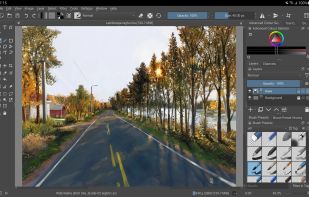
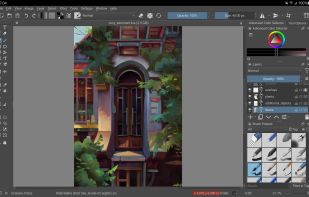
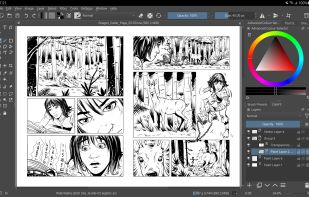
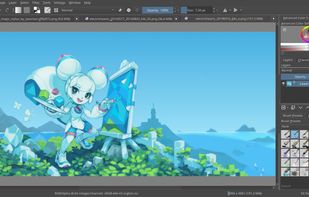
    Free, open-source painting software designed by artists for artists. Offers customizable UI, 9 brush engines, color management, tablet support, non-destructive editing, and privacy features. Portable and available on major platforms, supporting seamless texture creation.

    145 Krita alternatives

    Cost / License

    • Free
    • Open Source

    Application type

    Platforms

    • Mac
    • Windows
    • Linux
    • Android Tablet
    • KDE Plasma
    • Epic Games Store
    • PortableApps.com
    • F-Droid
    • Steam
    • AppImage
     
    |
    17
    Krita vs GIMP Comments
    Top Positive Comment
    tuva-hayabi
    3

    I disagree with most of the negative comments because you can actually do image manipulation/photo editing as well, at least the basic stuff like auto contrast, color balance, saturation, blur, sharpness, image size, canvas size and so on.

    Top Negative Comment
    Mosrod
    44

    Krita doesn't have photo editing tools and focuses on painting

    Richie Scassellati
    Positive
    2

    Krita is definitely a great alternative if you want something easier for digital art.

    3 of 17 comments
    • Krita is Free and Open SourceGIMP is also Free and Open Source
  2. Photopea icon
     344 likes

    Browser-based image editing supports PSD, XCF, Sketch formats, advanced layers, vector tools, RAW photo support, and exports in 40+ formats. Fully client-side with AI background removal, content-aware tools, and privacy as files never leave your device.

    113 Photopea alternatives

    Cost / License

    • Freemium
    • Proprietary

    Platforms

    • Online
    • Software as a Service (SaaS)
     
    |
    1
    Photopea vs GIMP Comments
    Guest
    Positive
    3

    It opens correctly all my PSD files.

    Review by a new / low-activity user.
    • Photopea is Freemium and ProprietaryGIMP is Free and Open Source
  3. PixiEditor icon
     19 likes

    Create pixel-perfect sprites, raster paintings, and scalable vector graphics with a unified open-source editor featuring frame-by-frame animation, a node-based workflow, custom shaders, procedural art tools, anti-aliased brushes, and versatile export options.

    40 PixiEditor alternatives

    Cost / License

    Application type

    Platforms

    • Windows
    • Linux
    • Flathub
    • Steam
    • Flatpak
     
  4. LazPaint icon
     46 likes

    Raster & vector graphic editor with many tools and filters, written in Lazarus. Portable, 32bit & 64bit versions, ORA format & 16384x16384 image support. In app 3D import & rendering.

    Cost / License

    Platforms

    • Mac
    • Windows
    • Linux
    • BSD
    • PortableApps.com
    • Flathub
    • Flatpak
     
    |
    3
    LazPaint vs GIMP Comments
    Daltro Auguso Campanher de Souza
    Negative
    1

    Bad workflow/usability. Not enough for professional use. Can't be compared to software like GIMP, Glimpse or Krita.

    Guest
    Positive
    2

    Cool render features, minimal but complete UI

    Review by a new / low-activity user.
    Guest
    Positive
    1

    More lightweight, suitable if you have an older PC / notebook and you just want to edit some stuff on the go.

    Review by a new / low-activity user.
    • LazPaint is Free and Open SourceGIMP is also Free and Open Source
  5. PhotoFiltre icon
     109 likes

    PhotoFiltre 7 is a complete image retouching program. It allows you to do simple or advanced adjustments to an image and apply a vast range of filters on it. It is simple and intuitive to use, and has an easy learning curve.

    124 PhotoFiltre alternatives

    Cost / License

    • Freemium
    • Proprietary

    Application type

    Platforms

    • Windows
    • PortableApps.com
     
  6. miniPaint icon
     30 likes

    miniPaint is free online image editor using HTML5. Edit, adjust your images, add effects online in your browser without installing anything. You can use the Electron based version of the editor if you like.

    36 miniPaint alternatives

    Cost / License

    • Free
    • Open Source

    Platforms

    • Linux
    • Online
    • Self-Hosted
     
  7. Flame Painter icon
     8 likes

    Flame Painter is a unique paint program that lets you create original artworks with flame brushes.

    Cost / License

    • Paid
    • Proprietary

    Application type

    Platforms

    • Mac
    • Windows
    • iPhone
    • iPad
     
  8. Pixelitor icon
     27 likes

    Open source image editor with non-destructive editing, 110+ filters, adjustment and text layers, support for smart objects and adjustment layers, cross-platform compatibility, and layer-based editing for flexible image composition.

    Cost / License

    Platforms

    • Mac
    • Windows
    • Linux
     
  9. GPS (aka Gimp Paint Studio) is a collection of brushes, patterns, color gradients, accompanying tool presets and dynamics. Tool presets are a simply saved tool options, highly useful feature of the GIMP.

    Cost / License

    • Free
    • Open Source

    Alerts

    • Discontinued

    Platforms

    • Mac
    • Windows
    • Linux
    • GIMP
     
  10. KRESKA.art icon
     7 likes

    KRESKA.art is a free online drawing and painting app that lets you create art directly in your web browser. It offers a simple interface, diverse brushes, and unique features like auto-color tracing. You can use it to sketch and paint without any downloads or installations.

    19 KRESKA.art alternatives

    Cost / License

    • Free
    • Proprietary

    Platforms

    • Online
     
12 of 37 GIMP alternatives