


miniPaint
33 likes
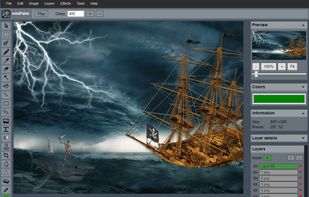
miniPaint is free online image editor using HTML5. Edit, adjust your images, add effects online in your browser without installing anything. You can use the Electron based version of the editor if you like.

Cost / License
- Free
- Open Source
Application typeApplication types
 EU
EUPlatforms
- Linux
- Online
- Self-Hosted

Features
miniPaint News & Activities
Highlights All activities
Recent News
No news, maybe you know any news worth sharing?
Share a News Tip
Recent activities
 Yassine B added miniPaint as alternative to ImageFlow.dev
 Serious Goose added miniPaint as alternative to PhotoSuite
- El_Dios_de_las_Ideas liked miniPaint
 Paul added miniPaint as alternative to PhotoFlare Studio
 lilike333 added miniPaint as alternative to Image to Layers AI
- Aerosol liked miniPaint


Featured in Lists


Privacy Services (WIP)
some privacy services. mostly taken from https://github.com/pluja/awesome-privacy, but I also take other suggestions.



Web Applications
Only freemium/free services, no trialware, no installation needed.


My PaaS
A list with 78 apps by 6feriolimarco without a description.
What is miniPaint?
miniPaint information
Developed by
 ViliusL
 Licensing
Open Source and Free product.Written in
Rating
Average rating of 4.7Alternatives
43 alternatives listedBadge
Get an embeddable badge for miniPaintSupported Languages

AlternativeTo Categories
Photos & Graphics, DevelopmentGitHub repository
- 3,468 Stars
- 792 Forks
- 49 Open Issues
- Updated


Comments and Reviews
A very complete and well-designed editor, with many functions to edit and create images online. The name Mini Paint is certainly wrong, in its functionalities it has nothing of "Mini", it is a powerful tool on a par with others.
It's more powerful than it looks. Despite it lacks of a lasso tool or a mask for layers it looks like a good option for free editing!
Used this online with Windows and could only save to JSON. I guess that's standard with a HTML5 editor.
miniPaint is great as an image editor or painting tool. It has all I need, including layers. The desktop applications Pinta and PhotoFlare, which I actually like to use under Xubuntu, crash too often.
MiniPaint is free, fast, and well-built.