
photobaer icon
photobaer icon

photobaer

photobaer is a free, open-source photo editor that runs in your web browser. It works offline and can be installed as an app. Your images are edited on your device and are never uploaded. No account, no ads, no subscription.
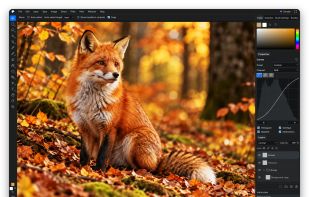
Curves adjustment layer with the Properties and Layers panels

Cost / License

Application type

Platforms

  • Online
  • Self-Hosted  Static files from the GitHub release ZIP, served by any web server over HTTPS.
0likes
0articles
Save

Features

Properties

  1.  Privacy focused

Features

  1.  Ad-free
  2.  Non Destructive Editing
  3.  Live Preview
  4.  Support for Layers
  5.  Built-in Color Picker
  6.  Custom Brushes
  7.  Pressure Sensitivity
  8.  No Tracking
  9.  No registration required
  10.  Drawing Tablet Support
  11.  Works Offline
  12.  Dark Mode
  13.  Hardware Accelerated
  14.  Raster graphics
  15.  Open PSD files

photobaer News & Activities

Highlights All activities

Recent activities

photobaer information

AlternativeTo Categories

Photos & Graphics, System & Hardware

GitHub repository

  •  0 Stars
  •  0 Forks
  •  0 Open Issues
  •   Updated  
View on GitHub
photobaer was added to AlternativeTo by IT-BAER on and this page was last updated .

No comments or reviews, maybe you want to be first?

Official Links

What is photobaer?

photobaer is a free, open-source photo editor that runs in your web browser. It works offline and can be installed as an app. Your images are edited on your device and are never uploaded. No account, no ads, no subscription.

It opens PNG, JPEG, WebP, GIF, BMP, AVIF and PSD files, saves PSD and its own .pbaer project format, and exports PNG, JPEG and WebP.

Editing works with layers, groups, layer and vector masks, blend modes, adjustment layers, fill layers, layer styles, smart objects, smart filters and layer comps.

Tools include marquee, lasso, magic wand, quick selection and color range selections, brushes with ABR import, clone stamp, healing brush, spot healing, patch, content-aware fill, dodge and burn, free transform and warp, crop, type, shapes, the pen tool, and blur, sharpen, noise and distort filters.

Menus, panels and keyboard shortcuts follow the familiar Photoshop layout (for example Ctrl+T for Free Transform and Ctrl+J for Duplicate Layer).

License: AGPL-3.0. Source code: https://github.com/IT-BAER/photobaer
