





FeedFlow
20 likes
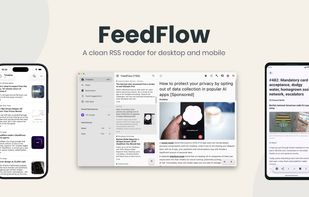
FeedFlow is a minimal RSS reader for people who want a clean, chronological timeline — no algorithms, no clutter, no noise. Just your feeds, in order.

Cost / License
- Free
- Open Source (Apache-2.0)
Application typeApplication types
 EU
EUPlatforms
- Windows
- Mac
- iPhone
- iPad
- Android
- F-Droid
- Linux
- Flatpak
- Flathub


Features
Highlights All activities
FeedFlow News & Activities
Recent activities





Developed by
 Marco Gomiero
 Licensing
Open Source (Apache-2.0) and Free product.Alternatives
89 alternatives listedBadge
Get an embeddable badge for FeedFlowSupported Languages
AlternativeTo Category
News & BooksApple AppStore
- Updated
- 4.49 avg rating
GitHub repository
- 1,251 Stars
- 68 Forks
- 97 Open Issues
- Updated






Beautiful Open Source Apps for Android (nice & modern UI/UX)
UI = User Interface
UX = User eXperience
Most open source apps offer out-dated or classic material design UI. If the apps works great and the UX is not terrible you might find it okay. But intuitive UI are better, and modern looking ones are pleasant to use, sadly they are not the majority. Here is my list of Beautiful Open Source Apps for your android device !
Apps are listed in alphabetical order !
Also look at : The ultimate F-Droid setup for more open source android apps.
and Beautiful Open Source Apps for iOS for your iOS device
DISCLAIMERS
Nice UI comes to personnal preference. So this list is only based on my taste of what is a good modern looking app.
While open source is great for privacy and security it is not perfect. So keep that in mind before downloading any apps.
I again encourage you to do your own research about them and read their Privacy Policies.
I am not a privacy and security expert. I'm also don't consider myself as a developper so I do not have any technical knowledge and so I didn't look into any source code of any apps in this list !


Beautiful Open Source Apps for iOS (nice & modern UI/UX)
UI = User Interface
UX = User eXperience
Open source apps are known for bad/inintuitive design. If the apps works great and the UX is not terrible you might find it okay. But intuitive UI are better, and modern looking ones are pleasant to use, sadly they are not the majority. Here is my list of Beautiful Open Source Apps for your iPhone !
Apps are listed in alphabetical order !
Also look at : Beautiful Open Source Apps for Android for more open source apps for an Android device.
DISCLAIMERS
Nice UI comes to personnal preference. So this list is only based on my taste of what is a good modern looking app.
While open source is great for privacy and security it is not perfect. So keep that in mind before downloading any apps.
I again encourage you to do your own research about them and read their Privacy Policies.
I am not a privacy and security expert. I'm also don't consider myself as a developper so I do not have any technical knowledge and so I didn't look into any source code of any apps in this list !



Open-Source Slopware
A list of open-source software containing slop (LLM generated) code or endorses the usage of LLMs in other ways.
This list contains software that obviously accepts irresponsible coding practices or promotes LLM usage. I found these applications while searching for alternatives to previously used software that turned out to contain code generated by slop-machines.
Each of added applications have at least one link that points to the verifiable proof.
This list by no means is meant to cover all the software that contains code by not-so-intelligent tools and people using them but to serve as a reminder to myself about what I have already checked.
Why having LLM generated code (and using generative tools in general) is bad?
Ethical reasons — such as illegally retrieved training material, underpaid workers that prepare the training data.
Impact on environment — increased fossil fuel usage to supply the needed electricity power, water usage in water scarce regions. This somewhat overlaps with the above.
Social impact – noise pollution in neighbourhoods near AI data centres, air pollution from diesel- or gas-powered turbines (also overlaps with the above), resource consumption by data centres drastically increases utility prices.
Impact on brain and thinking, reasoning — by offloading thinking and decision making to machines people are shooting in their foot (more like in their head) as this leads to brain rot. Less intelligent people are easier to control.
Even legal issues (especially in open-source software as it cannot be guaranteed that the “generated” code is not really just re-used, thus unknowingly violating the source license).
Inevitable enshittification — every software product from big technology eventually gets enshittified to maximize revenue. For users this could mean hidden or plain ads, biased opinions/information, privacy violations, increased prices for LLM based tools.
Burden on open-source software maintenance — LLM tools provide easier access to code contributions which often shifts the responsibility of checking code quality from developers to maintainers and reviewers. Digging through walls of merge request text and code generated by slop-machines takes valuable time that otherwise could be spent more meaningfully by fixing bugs and working on new features.
I will try to add links that back up the claims above, but it may take a while.
Of course, I see how and where generative tools could be helpful and sometimes I feel tempted to find an acceptable way to use them, but for now the direct and indirect costs far too much outweigh gains.
This list has its positive counterpart: Slop-Free (Supposedly) Open-Source Software (not quite complete yet).
Also take a look at and give thumbs up to AI Slopfree Software Catalog which contains software dedicated against usage of LLMs.
Also, here is a list of some labels that can be added / voted for so they would eventually appear on application pages:
Slopware;
Slop (LLM) Code;
Slop-Source Software;
Open-Source Slopware;
Contains Slop (LLM Generated) Code.




Comments and Reviews
Edit: the original comment is below. I still have high hopes for this app, the problem I mentioned in the original comment seems resolved now, but I forgot to mention another complaint I had with the app which is the absence of support for RTL feeds. Once it handles that too, I think I will give the app another go and might stick with long-term, but for the time being, Capy Reader on Android, Fluent Reader on Windows are serving their purpose very well for my needs.
This app has potential, a bright future awaits it if the developers keep at it, I truly can see it being my cross-platform favorite RSS reader especially since it has such a great UI. But for now, it's still immature, I tried the android app, I love that it enables you to turn notifications for your desired feed, I wish Capy (my current android choice) would implement it too, but the app suffered from a serious bug, whenever I scroll down and read articles from the past, the new articles preceding all disappear! So I stopped using it. Version tested: 1.90.0
simple and very functional