


CoverFlowFinder
12 likes
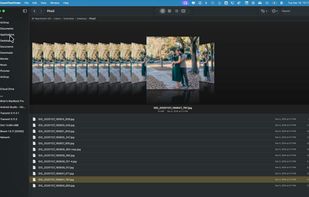
Brings iconic 3D Cover Flow file browsing to macOS, includes dual pane navigation, Quick Look integration, sidebar access to volumes, instant file sorting, context menus, type-ahead search, familiar Finder-like interface, and open source availability.

Cost / License
- Free
- Open Source (MIT)
Application type
Platforms
- Mac

Features

CoverFlowFinder News & Activities
Highlights All activities
Recent News
No news, maybe you know any news worth sharing?
Share a News Tip
Recent activities
 Dorien Herremans added CoverFlowFinder as alternative to Iruka
 Iakov-Senatov added CoverFlowFinder as alternative to mimiNavigator
 Maik-Hofmann added CoverFlowFinder as alternative to Peach Commander
 DomIsDazed added CoverFlowFinder as alternative to MA Files
 kazuy added CoverFlowFinder as alternative to DraftFinder
- Ahmed Gaveem liked CoverFlowFinder
 nickn17 added CoverFlowFinder as alternative to nViPER
 Paul added CoverFlowFinder as alternative to Files App
 mburlac added CoverFlowFinder as alternative to Empiric Commander
- dreamerSon liked CoverFlowFinder


CoverFlowFinder information
Developed by
 Brian Elliott Tate
 Licensing
Open Source (MIT) and Free product.Written in
Alternatives
61 alternatives listedBadge
Get an embeddable badge for CoverFlowFinderSupported Languages

AlternativeTo Categories
File Management, System & HardwareGitHub repository
- 163 Stars
- 7 Forks
- 10 Open Issues
- Updated


Comments and Reviews
Excellent project! I never understood why the Finder never added the very useful dual-pane option. It's a shame I can only use it on my Mac Mini M4 Pro but not on my 2019 Mac Pro with macOS Monterey. Thank you so much @elliotttate for your amazing project!
Good Luck with your perfect idea!