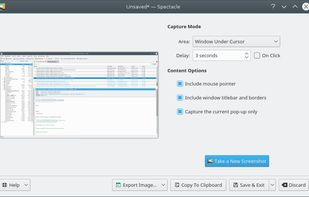
Spectacle is a simple application for capturing desktop screenshots. It can capture images of the entire desktop, a single monitor, the currently active window, the window currently under the mouse, or a rectangular region of the screen.

ClipAce is described as 'AI-powered screenshot utility with region, window, or full capture, background removal, OCR text extraction, editing, watermark, signature, and enhancement tools' and is a screenshot capture tool in the photos & graphics category. There are more than 50 alternatives to ClipAce for a variety of platforms, including Windows, Mac, Linux, Google Chrome and Mozilla Firefox apps. The best ClipAce alternative is ShareX, which is both free and Open Source. Other great apps like ClipAce are Flameshot, Greenshot, OSS Document Scanner and Snipping Tool.
Spectacle is a simple application for capturing desktop screenshots. It can capture images of the entire desktop, a single monitor, the currently active window, the window currently under the mouse, or a rectangular region of the screen.


Shottr is a compact screenshot app designed for pixel precision and optimized for macOS Silicon devices.


Your portable scanner. Use your camera to get high quality scans of paper documents, receipts, notes and more. Anytime, anywhere.


Capture and record screens on Mac with CleanShot X, featuring seamless recording, custom keyboard shortcuts, customizable wallpapers, Quick Access Overlay, and Desktop icon toggle for a tidy user interface.


Comprehensive screenshot and screencast tool offering full-screen, window, or region captures with a built-in editor. Supports cropping, resizing, labels, and effects, with integration for popular services. Free version includes some branding and is limited to 15s screen casts.


Capture2Text enables users to quickly OCR a portion of the screen using a keyboard shortcut.


Snipaste is a simple but powerful snipping tool, and also allows you to pin the screenshot back onto the screen. Snip. Then paste. Free. Customizable. Portable.


Flamory remembers things, so you don't have to. Make snapshots of web pages, files and desktop apps. You can find snapshots later using full-text search and thumbnails. Paste them anywhere as links or screenshots.


Capture full web page screenshots in Firefox, Chrome, Opera, Pale Moon or Internet Explorer Quick screenshots and annotations!


Free AI-powered snipping tool featuring text extraction from images, instant translation in 100+ languages, screenshot question answering, and text-based editing. Annotate, summarize content, remove objects, or add highlights to captures—no editing skills needed.


Capture full and partial screenshots, record screen or webcam videos with extensive editing tools, including annotations, video conversion to gif/mp4, and sharing options. Create step-by-step guides enhanced by AI, save in multiple formats, and utilize cloud storage integration.