Apps tagged with 'pdf-sign'

All apps in Apps tagged with 'pdf-sign' category. Use the filters below to narrow down your search. 
Copy a direct link to this comment to your clipboard
  1. Adobe Acrobat DC icon
     204 likes

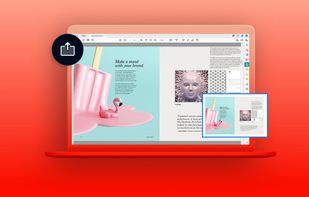
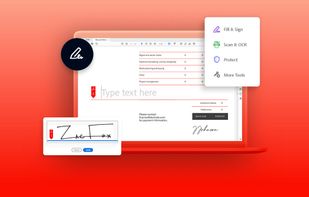
    Create and edit PDFs. Collaborate with ease. E-sign documents and collect signatures. Get everything done in one app, wherever you work. Acrobat’s got it. Stay on top of your documents with powerful features for desktop, mobile, and web.

    Cost / License

    • Paid
    • Proprietary

    Application types

    Platforms

    • Mac
    • Windows
    • Online
    Adobe Acrobat DC screenshot 1
    Adobe Acrobat DC screenshot 1
    Adobe Acrobat DC screenshot 2
    +2
    Adobe Acrobat DC screenshot 3
    317 alternatives
    3.2
    Fair12 reviews
  2. PDFCreator icon
     261 likes

    PDFCreator allows you to convert any document into a PDF by acting as a virtual printer. It offers features like merging, digital signatures, password protection, and automation for efficient workflows. Its user-friendly settings help you optimize your PDFs easily.

    Cost / License

    • Free Personal
    • Open Source

    Application type

    Alerts

    • Bundleware

    Platforms

    • Windows
    PDFCreator 6.0.0 interface
    PDFCreator 6.0.0 interface
    PDFCreator 6.0.0 interface
    +3
    PDFCreator 6.0.0 interface
    107 alternatives
    2.3
    Poor10 reviews
  3. DocuSeal icon
     22 likes

    DocuSeal allows you to create, fill, and sign digital documents. Use for free in the Cloud or on-premises. #1 Open source alternative to DocuSign, Pandadoc etc. Developer-friendly and can be integrated into apps.

    Cost / License

    Application type

    Platforms

    • Online
    • Self-Hosted
    • Cloudron
    DocuSeal screenshot 1
    DocuSeal screenshot 1
    DocuSeal screenshot 2
    79 alternatives
  4. Signature PDF icon
     9 likes

    Free open-source web software for signing (alone or with others), organizing (merge, sort, rotate, delete, extract pages, ...), editing metadatas or compressing PDFs.

    Cost / License

    Application type

    Platforms

    • Online
    • Self-Hosted
    • WebApps
    • Docker Hub
    Signature PDF screenshot 1
    Signature Interface
    Signature Interface
    +5
    Signature PDF screenshot 3
    68 alternatives
  5. PDF4QT icon
     8 likes

    Open-source PDF viewer/editor using Qt framework with C++ library, multithreading, hardware rendering, encryption, text layout, and form tools.

    Cost / License

    • Free
    • Open Source (MIT)

    Application types

    Platforms

    • Windows
    • Linux
    • Flathub
    PDF4QT screenshot 1
    PDF4QT screenshot 1
    103 alternatives
  6. UPDF Sign icon
     Like

    UPDF Sign is an online tool for digitally signing PDF documents. It allows users to sign, send, and manage documents securely and efficiently. It uses legally-binding, certificate-based signatures, enabling documents to be sent, signed, and tracked securely from any device...

    Cost / License

    • Paid
    • Proprietary

    Application type

    Platforms

    • Online
    • Software as a Service (SaaS)
    UPDF Sign screenshot 1
    UPDF Sign screenshot 1
    UPDF Sign screenshot 2
    +4
    UPDF Sign screenshot 3
    47 alternatives
  7. DocHub icon
     12 likes

    Facilitates online document editing, signing, and form completion with PDF management tools, eSignatures, templates, and real-time collaboration.

    Cost / License

    • Freemium
    • Proprietary

    Application type

    Platforms

    • Online
    • Google Chrome
    • Google Drive
    • Dropbox
    • Android
    • iPhone
    • iPad
    DocHub screenshot 1
    DocHub screenshot 1
    DocHub screenshot 2
    +2
    DocHub screenshot 3
    105 alternatives
  8. Free, open-source desktop app for legally binding PDF digital signatures. Sign with PKCS#11 hardware tokens, USB dongles, smart cards, PFX certificates, or Windows keystore. Adobe-compatible, RFC 3161 timestamped, fully offline — no cloud, no subscription.

    Cost / License

    Platforms

    • Windows
    • Linux
    • Mac
    Certificate Selection
    Existing Signature field detection.
    Guide info
    +11
    Main screen
    8 alternatives
  9. Documenso icon
     2 likes

    Signing documents digitally should be fast and easy and should be the best practice for every document signed worldwide.

    Cost / License

    Application type

    Platforms

    • Online
    • Self-Hosted
    • Cloudron
    Documenso screenshot 1
    Documenso screenshot 1
    69 alternatives
  10. DeftPDF icon
     5 likes

    An all-in-one free online PDF editor that does not require subscriptions or installations! DeftPDF is a free online tool that makes editing and converting PDF easy in just a few clicks!.

    Cost / License

    • Freemium
    • Proprietary

    Application type

    Platforms

    • Online
    • Chrome OS
    • Software as a Service (SaaS)
    Deft PDF homepage
    Deft PDF's screenshot of all tools listed on the site. All unlimited to use for free
    Deft PDF translation tool which is easy to use and free
    +2
    Deft PDF easy to use converter - just upload, convert and save!
    128 alternatives
  11. JSignPdf icon
     1 like

    JSignPdf is a Java application which adds digital signatures to PDF documents. It can be used as a standalone application or as an Add-On in OpenOffice.org. The application uses the jsignpdf-itxt library for PDF manipulations (based on iText library in version 2.1.

    Cost / License

    • Free
    • Open Source

    Platforms

    • Mac
    • Windows
    • Linux
    • LibreOffice
    • Apache OpenOffice
    JSignPdf screenshot 1
    JSignPdf screenshot 1
    17 alternatives
  12. VivPDF Editor icon
     2 likes

    It's virtually the fastest solution for users to edit PDF documents in any circumstances, all you need to do is several clicks!.

    Cost / License

    • Paid
    • Proprietary

    Application type

    Platforms

    • Windows
    VivPDF product starts very quickly and goes directly to the main interface in no time.
    Full features for text editing and what you see is what you get .
    Full function of page editing, including insert, delete, cut, rotate, extract, split, merge and so on.
    +2
    
Editing Header and footer is as easy as Adobe Acrobat.
    141 alternatives
  13. PortableSigner is a signing (with X.509 certificates) program for PDF files. It's platform independent and runs (tested) under Windows (2000, XP, ...), Linux, and macOS.

    Cost / License

    • Free
    • Open Source

    Platforms

    • Mac
    • Windows
    • Linux
    PortableSigner screenshot 1
    PortableSigner screenshot 1
    27 alternatives
  14. Fill icon
     1 like

    Fill makes it super easy to complete your PDF form. It is built to work like Google Docs for PDFs. Sign documents yourself, or send them to one or more other people to sign. Download your completed forms as PDFs, or email them directly to colleagues.

    Cost / License

    • Freemium
    • Proprietary

    Platforms

    • Online
    Signing forms
    Dashboard
    Editor
    44 alternatives
  15. Transform your documents effortlessly with our comprehensive suite of free online conversion tools. Our platform offers professional-grade PDF converters, Excel utilities, and image processors.

    Cost / License

    • Free
    • Proprietary

    Platforms

    • Online
    • Google Chrome
    • Software as a Service (SaaS)
    • Mozilla Firefox
    PDF All Tools screenshot 1
    PDF All Tools screenshot 1
    PDF All Tools screenshot 2
    +2
    PDF All Tools screenshot 3
  16. The Apache PDFBox™ library is an open source Java tool for working with PDF documents. This project allows creation of new PDF documents, manipulation of existing documents and the ability to extract content from documents.

    Cost / License

    • Free
    • Open Source

    Platforms

    • Mac
    • Windows
    • Linux
    24 alternatives
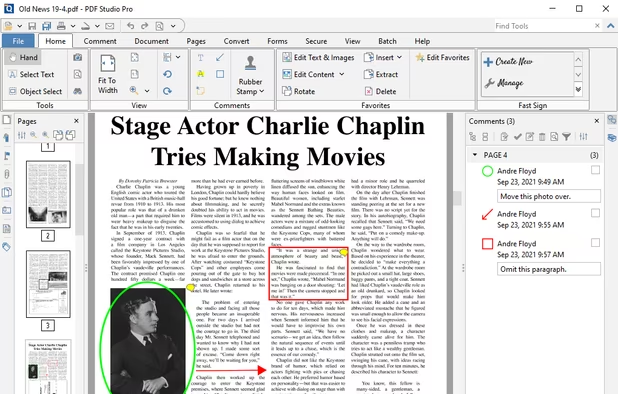
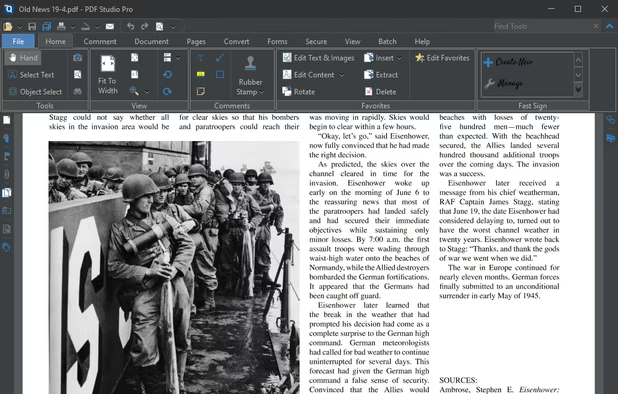
  17. deskPDF Studio XE gives you the power to edit text & images directly, highlight, cross-out & underline text, and add markups and annotations to your documents.

    Cost / License

    • Paid
    • Proprietary

    Platforms

    • Mac
    • Windows
    deskPDF Studio XE screenshot 1
    deskPDF Studio XE screenshot 1
    deskPDF Studio XE screenshot 2
    +2
    deskPDF Studio XE screenshot 3