Why Paperwing?
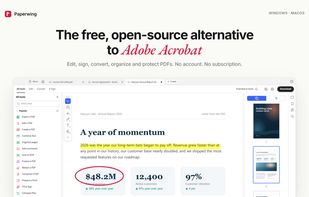
If you've used Acrobat, you already know how to use Paperwing: the same tabbed workspace, All tools panel, Edit / Convert / E-Sign tabs, floating quick-action toolbar and right-hand navigation rail — and the same keyboard shortcuts.
What you won't find: sign-in prompts, cloud nags, trial pop-ups, AI overlays, paywalled buttons or a monthly bill. Every feature is free, and your files never leave your computer.
Designed around Acrobat's most common complaints.
🔒 Private by default — everything runs locally; no account, telemetry or uploads
⚡ Fast and light — opens in about a second, scrolls at a steady 60 fps, and restores your last session without loading every document up front
🖼️ PDF thumbnails in File Explorer (Windows) while Paperwing is your default PDF app
⌨️ Acrobat shortcuts — including the single-key tool accelerators (H, V, S, U, D, X…), on by default
🔎 Command palette — Ctrl+Shift+P finds any tool or command instantly
📌 Pin your tools — pinned and recently used tools sit at the top of the tools panel
💾 Never lose work — unsaved-change markers, save prompts on close, session restore, and recovery of documents a tool made but you hadn't saved yet if the app closes unexpectedly
📍 Pick up where you left off — documents reopen at the page and zoom you left them at
📚 Batch tools — run Compress, Flatten, PDF to Word and other tools on many files at once
🔄 Updates itself (Windows installer): new versions download in the background
↩️ Reopen closed tab — Ctrl+Shift+T, just like your browser
🧪 Non-destructive tools — results open in a new tab; your original stays untouched until you save
🗂️ Native file dialogs and real "Save" back to the original file
🎒 Portable mode on Windows — run from a USB stick with settings stored next to the app







 rohanvijaykumar added Paperwing PDF as alternative to Adobe Acrobat Reader, SumatraPDF, Okular, Foxit PDF Reader and 145 more
 Rohan Vijaykumar


No comments or reviews, maybe you want to be first?