A free, open-source viewer for Windows, supports PDFs, eBooks, Comics, with a simple, fast, and portable design prioritized for ease of use.



A free, open-source viewer for Windows, supports PDFs, eBooks, Comics, with a simple, fast, and portable design prioritized for ease of use.


Store bookmarks with related content, organize thematically with real-time collaboration and privacy focus, offering web clipper and cloud sync.


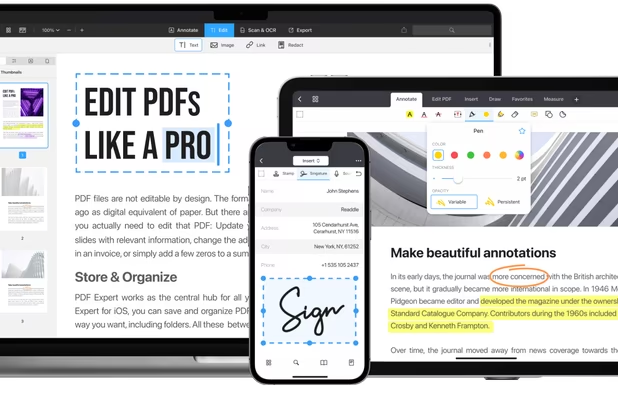
Free, lightweight PDF viewer available on multiple platforms. Features include annotation, form-filling, signing, cloud integration, and more.


Open-source screenshot tool with cross-platform support, customizable interface, built-in editing, CLI access, and direct Imgur uploads.


Handwritten notes and PDF annotation app with pen input, shape drawing, customizable toolbar, image insertion, audio recording, and multi-platform support.


Save web links and email newsletters, add notes and highlights, tag and favorite articles, and read distraction-free in a Markdown viewer online or offline.


View, annotate, and collaborate on PDFs, utilize cloud storage and freehand tools. Upgrade for editing and converting to other formats.


Save, annotate, and organize web resources with highlighters, sticky notes, cross-device sync, Outliner, advanced search, and flexible sharing options.


Read and annotate PDFs, highlight text, make and save notes, fill interactive forms, and share files with support for cross-platform annotations and cloud integration.


LINER AI Copilot, powered by ChatGPT/GPT-4 and Google Search, provides high-quality information to make your web browsing experience as enriching as possible. It's designed to help you get more done with less time and energy, offering features such as translation, sentence...

Oku is the companion app for your bookshelf. Track your reading, review & recommend books, create custom collections & follow your friends to receive their updates.


Glasp is a social PDF & Web highlighter that allows you to collect, organize, and share insightful ideas from the web. With your highlights and notes, you can build a personalized AI clone, creating a dynamic, collective knowledge-sharing experience.


PDF Candy is an online PDF toolset of 47 services for successful processing of PDF files. The service is free for single-file operations and does not require an account. A desktop application is also offered,


Auto Highlight a fully automatic and easy to use text marker / highlighter / style fixer. No need to use search anymore to find important information!


Every screen content can be made available as a digital drawing area so that you can mark and highlight important things. Thus Pointofix is ideal for you as a teacher or IT trainer to support your lectures, training courses and presentations.

Front Sketch simulates a glass sketchpad above your computer desktop. You can virtually draw, write, mark, capture on your desktop during run-time. The flexible floating toolbar is in a vertical position.


Focus Window Highlighter helps you stay productive by visually highlighting your currently active window. In today's multi-window, multi-monitor work environments, it's easy to lose track of which window is in focus.


INKredible is an app with a single mission: to make your handwriting experience on tablets as good as, if not better, than pen on paper.


One platform to organize all your highlights - import Kindle highlights and annotate the web with the built-in highlighter.


Firefox extension. Highly customizable text highlighter with different colors and save option for later visits.


Kjuicer lets you highlight text on the web and automatically creates a three level summary (in - depth, medium and short).


Wired-Marker is a permanent (indelible) highlighter that you use on Web pages. The highlighter, which comes in various colors and styles, is a kind of electronic bookmark that serves as a guide when you revisit a Web page.

Chrome highlighter that quickly and easily puts your highlights into Roam format for easy pasting into your notes. This Highlighter extension is meant for use with the Roam Research note taking application (but can be used for other purposes as well).

Pull lets you highlight great quotes and share them as sleek images. Simply select text from the web in Safari and use the Pull Action Extension to get started. You can also access a history of previous Pulls so you can share them again and again.