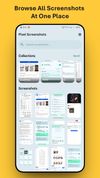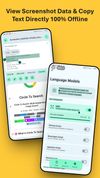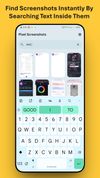
Whenever you take a screenshot, the app automatically shows it as a small floating bubble on your screen.
Cost / License
- Freemium
- Open Source (GPL-3.0)
Application typeApplication types
Platforms
- Android

India


Whenever you take a screenshot, the app automatically shows it as a small floating bubble on your screen.


OCRMyScreen is a small, focused utility that lets you capture text from anywhere on your screen, especially in places where normal copy-paste simply does not work. Instead of retyping error messages, one-time codes, or text inside images and locked UIs, you press a button, drag...


Free screenshot tool with screen recording, instant capture, pixelation, blur, advanced annotation editor, history, hotkeys, and dark mode.


SnapNDrag makes taking screenshots super easy. Click, select and the screenshot is added to your library. SnapNDrag maintains a library of all the screenshots you have ever taken. Think of it as iPhoto for screenshots.


Everyone takes screenshots.You may be a student, researcher, traveler, influencer, foodie, photographer, architect, engineer, entrepreneur or just a meme lover (well who doesn’t love memes) & If you go scroll through your screenshots, you’ll be reminded of moments you...


Recorder.app is designed to meet all your screen recording needs. Capture and record from multiple sources simultaneously. Record your entire screen, individual windows, camera video, microphone audio, and more.


ffscreencast is an ffmpeg screencast/desktop-recording tool for the command-line with video overlay and multi monitor support.


Picsew can automatically merge multiple screenshots to a long screenshot, and we call this long screenshot "Scrollshot".


MWSnap is a small yet powerful Windows program for snapping (capturing) images from selected parts of the screen.


puush is a super-quick way to share screenshots and files. Quickly capture any portion of your screen, upload any file, and share them with a short URL automatically placed in your clipboard. Share them with the world or make them private, for your eyes only.


Jumpshare is fast file sharing built into the menu bar. Just drag a file to the Jumpshare icon in the menu bar and a link will be copied to your clipboard instantly, ready to be shared. If you’re looking for a more personal way to share your files, you can email them directly...


Hotshots is a screenshot tool with some editing features. It is particularly suitable for writing documentation (as used in the following chapters) but you can use it to highlight some details on a map image or what ever you want.


Create customized screenshots, browser and device mockups, code snippets, and social media images using templates, presets, browser extension, or API integration.


Snipboard (previously known as Snaggy) is an image host that lets you quickly paste and share images from your clipboard directly online.


Capture full pages, visible areas, selections, and batches of URLs. Annotate, edit, and export as PNG, JPG, or PDF.


Pensela is an screen annotation tool that can also take screenshots available cross-platform.


Dubble watches how you work and translates your actions into written step-by-step guides, videos and screenshots - so you don’t have to.


CarryLinks is the complete bookmark manager. Easily and privately access and manage your bookmarks from anywhere for free. It is available as a browser extension, website, and progressive web app for mobile devices and tablets.


Leawo Free Screen Recorder is a 100% free screen recorder combo, allowing you to record videos with up to 4K quality from screen, webcam, system sound or/and Microphone.


Thumbnail me is a free and open source thumbnails generator built on the movie thumbnailer binary.

ZScreen is an open-source screen capture program that allows for region/window/full-screen screenshots. It can upload screenshots and put the URL in your clipboard in a single keystroke. It supports automatic custom naming conventions with variables.

Deepin Screen Recorder is a screen recorder tool, it supports to save the recorded screens as gif or mp4 format. It can select the recorded window automatically or manually by selecting the area. Users just need to start and stop the recording process, and the file will autosave...


Easy-to-use Windows tool for capturing screen or selected area with system audio, microphone, and webcam. Supports screenshots, hotkeys, and various output formats.