





OpenScreenShot
15 likes
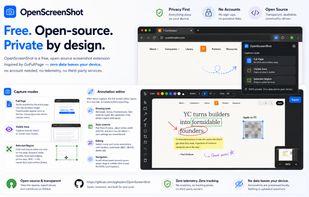
Browser extension for full, region, and visible-area screenshots, local annotation, PDF and format export, customizable, free, open source, fully offline, no account or telemetry, zero ads, no third parties, using only needed permissions, privacy-focused.

Cost / License
- Free
- Open Source (MIT)
Application type
Platforms
- Google Chrome
- Mozilla Firefox


Features
OpenScreenShot News & Activities
Highlights All activities
Recent activities
 Graziella added OpenScreenShot as alternative to OddSnap
 Omar-Khaled added OpenScreenShot as alternative to Shotnix
 Don added OpenScreenShot as alternative to Page Scanner
- Croco Loki updated OpenScreenShot
 Mustafa Özel added OpenScreenShot as alternative to VidShrink
 MUZEEBURRAHAMAN added OpenScreenShot as alternative to GoFully
 PB2025 added OpenScreenShot as alternative to FullGrab
 c17s5qhu added OpenScreenShot as alternative to Zipline Android
 Benoks added OpenScreenShot as alternative to EShot
- tooaverage added OpenScreenShot as alternative to Foldout Screenshot


OpenScreenShot information
Developed by
 PGHQ
PGHQ Licensing
Open Source (MIT) and Free product.Written in
Alternatives
66 alternatives listedBadge
Get an embeddable badge for OpenScreenShotSupported Languages

AlternativeTo Categories
Photos & Graphics, Web BrowsersGitHub repository
- 82 Stars
- 7 Forks
- 0 Open Issues
- Updated


Comments and Reviews
Thanks for sharing this with the community! I was using GoFullPage on my Brave browser until it recommended me removing that extension, which I promptly did. Then I came to AlternativeTo.net looking for a replacement to it and surprisingly found OpenScreenShot a very good alternative, which - until now - I'm enjoying for it's ease of use, exporting functionalities, etc.