




Snippy Snip
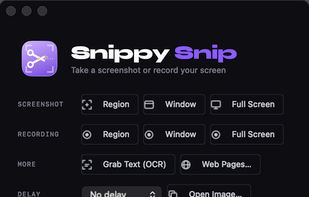
Snippy Snip is the snipping tool your Mac always needed: paste-ready screenshots that land on your clipboard instantly, a full annotation editor that keeps the clipboard in sync as you edit, and screen recording you can watch before you keep it.

Cost / License
- Freemium (Pay once)
- Proprietary
Application typeApplication types
Since
- Since 2026


Features
Snippy Snip News & Activities
Recent activities
- reviewed Snippy Snip★★★★★
Great tool for Mac. It has all the tools that are actually useful to mark up screenshots. I created a screenshots folder on my desktop so it consolidates the screenshot library there instead of having them floating around on my Desktop. You can also customize the colors you like to use to markup.
Snippy Snip is what's missing from Mac's own ecosystem. I love the annotation and ability to have a running gallery of recent captures so I can grab, mark up, and share several screenshots without losing track of any of them. The toolbar has everything I actually use (highlighter, arrows, shapes, redaction, crop) without feeling bloated, and the option to keep the window visible while capturing is a small thing that makes a big difference. Copy All and Save All are great when I'm pulling...
- ddibernardo added Snippy Snip
 ddibernardo added Snippy Snip as alternative to Snagit, CleanShot X, ShareX, Greenshot and 8 more
- ddibernardo added Snippy Snip as alternative to Snagit

Developed by
 DB Ventures
Licensing
Proprietary and Freemium product.Pricing
One time purchase (perpetual license) that costs $19 + free version with limited functionality.Alternatives
12 alternatives listedBadge
Get an embeddable badge for Snippy SnipSupported Languages



Comments and Reviews
Great tool for Mac. It has all the tools that are actually useful to mark up screenshots. I created a screenshots folder on my desktop so it consolidates the screenshot library there instead of having them floating around on my Desktop. You can also customize the colors you like to use to markup.
Snippy Snip is what's missing from Mac's own ecosystem. I love the annotation and ability to have a running gallery of recent captures so I can grab, mark up, and share several screenshots without losing track of any of them. The toolbar has everything I actually use (highlighter, arrows, shapes, redaction, crop) without feeling bloated, and the option to keep the window visible while capturing is a small thing that makes a big difference. Copy All and Save All are great when I'm pulling together screenshots for documentation. Highly recommend for anyone who takes screenshots as part of their daily workflow.