Apps tagged with 'Temperature Monitoring' Page 3 of 3

All apps in Apps tagged with 'Temperature Monitoring' category. Use the filters below to narrow down your search. 
Copy a direct link to this comment to your clipboard
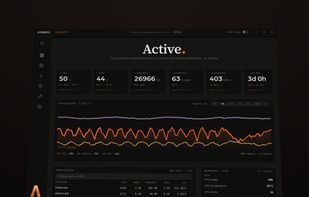
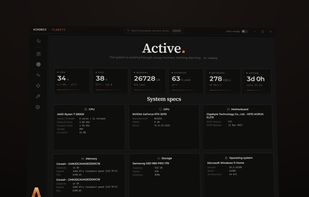
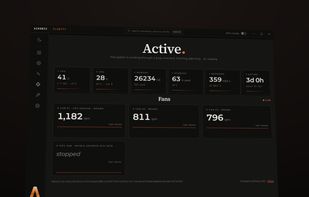
  1. Shows CPU, GPU, memory, storage, network and fan readings on Windows, labeling unavailable sensors rather than estimating them; includes SMART checks.

    Cost / License

    • Freemium (Pay once)
    • Proprietary

    Since

    • Since 2026

    Platforms

    • Windows
    • CH flagSwitzerland
    Aikonic Clarity screenshot 1
    Aikonic Clarity screenshot 2
    Aikonic Clarity screenshot 3
    +2
    Aikonic Clarity screenshot 4
    40 alternatives
  2. Shows Mac resource stats in menu bar and dashboard, explains system activity in plain language, reclaims memory on demand, monitors storage, network, temperatures, and requires no account or tracking.

    Cost / License

    • Pay once
    • Proprietary

    Application type

    Since

    • Since 2026

    Platforms

    • Mac
    • HK flagHong Kong
    Sharp Lynx screenshot 1
    Sharp Lynx screenshot 2
    Sharp Lynx screenshot 3
    Sharp Lynx screenshot 4
    18 alternatives
  3. FrameHeat icon
     Like

    FPS counter and hardware monitor for Windows 11: CPU, GPU, VRAM, RAM and disk temperatures and load, plus the frame rate of your game, in a click-through overlay widget.

    Cost / License

    • Free
    • Open Source (MIT)

    Since

    • New

    Platforms

    • Windows
    FrameHeat screenshot 1
    FrameHeat screenshot 2
    FrameHeat screenshot 3
    13 alternatives
  4. Pitwall icon
     Like

    Pitwall is a lightweight hardware monitor for Windows, built to live on a secondary monitor (or a small 5"/7" screen, or an ultra-wide strip like a Xeneon Edge) instead of an overlay on top of your game.

    Cost / License

    • Free
    • Open Source (MIT)

    Since

    • New

    GitHub

    • GitHub stars: 1

    Platforms

    • Windows
    • BR flagBrazil
    Full widget on a secondary monitor
    Monitor page with every sensor live
    Strip layout for ultra-wide screens like the Xeneon Edge
    +1
    Shareable game session card
    6 alternatives
  5. Bento Stats is a light system monitor that lives in the Mac menu bar. It shows CPU and GPU cores, memory, network, SSD, battery, temperatures and fans as a grid of cards that you can resize and rearrange, plus a MacBook mode that places every reading on a drawing of the inside...

    Cost / License

    • Free
    • Open Source (MIT)

    Since

    • New

    Platforms

    • Mac
    Bento Stats screenshot 1
    2 alternatives
  6. FanBar icon
     Like

    FanBar is a free, open-source macOS menu bar app that monitors temperatures and controls fan speed. Live temperature and fan RPM readout in the menu bar, manual fan control with Silent/Balanced/Performance/Extreme presets plus up to 6 fully custom presets (own name, icon and fan...

    Cost / License

    Since

    • New

    GitHub

    • GitHub stars: 71

    Platforms

    • Mac
    • CN flagChina
    main
    setting
    setting
    5 alternatives
  7. Monny icon
     Like

    Monny lives in the menu bar and shows CPU, memory, disk, network, per-core load and battery. A dashboard window adds history charts (1 minute to 7 days), top processes and temperature sensors.

    Cost / License

    • Free
    • Open Source (MIT)

    Since

    • New

    GitHub

    • GitHub stars: 26

    Platforms

    • Mac
    Monny screenshot 1
    Monny screenshot 2
    +3
    Monny screenshot 3
    5 alternatives
  8. TrayTemps icon
     Like

    Lightweight Windows hardware monitor that displays CPU and GPU temperatures in the system tray, with a customizable OSD and built-in FPS counter.

    Cost / License

    • Free
    • Open Source (MIT)

    Since

    • Since 2026 (updated Aug 2026)

    GitHub

    • GitHub stars: 21

    Platforms

    • Windows
    • RO flagRomania
    • European Union flagEU
    Application Settings, Tray Icons Preview, and Temperature-Based Settings Dialog (Light Theme)
    Main Window & Hardware Information Dialog (CPU)
    OSD Preview, OSD Settings Dialog, and Application Settings Section
    7 alternatives
  9. FixStat icon
     Like

    FixStat is a free, open-source menu bar monitor and diagnostics app built for Mac repair technicians. Instead of raw SMC keys it shows temperature sensors with names verified for each Mac model, and its technician mode adds battery cell voltages, gauge data, the adapter's...

    Cost / License

    • Free
    • Open Source (MIT)

    Since

    • New

    GitHub

    • GitHub stars: 19

    Platforms

    • Mac
    Menu bar panel with battery, temperatures and system load
    +2
    Technician mode: battery gauge data and every sensor grouped by component
    6 alternatives
  10. Digital Sauna is a lightweight temperature monitoring tool. It displays real-time CPU, GPU, and hardware temperatures in a clean, modern interface, helping you monitor system health, detect overheating, and protect your computer.

    Cost / License

    • Free
    • Proprietary

    Since

    • Since 2026

    Platforms

    • Windows
    • FR flagFrance
    • European Union flagEU
    Digital Sauna screenshot 1
    +1
    Digital Sauna screenshot 3