
TrayTemps icon
TrayTemps icon

TrayTemps

Lightweight Windows hardware monitor that displays CPU and GPU temperatures in the system tray, with a customizable OSD and built-in FPS counter.
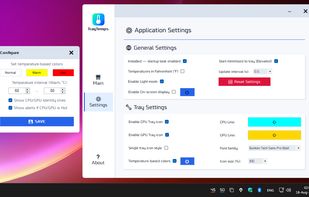
Application Settings, Tray Icons Preview, and Temperature-Based Settings Dialog (Light Theme)

Cost / License

  • Free
  • Open Source (MIT)

Platforms

  • Windows
0likes
0comments
0articles

Features

Properties

  1.  Lightweight
  2.  Privacy focused

Features

  1.  No registration required
  2.  Ad-free
  3.  Portable
  4.  No Tracking
  5.  Works Offline
  6.  Dark Mode
  7.  CPU temperature
  8.  Sits in the System Tray
  9.  Temperature Monitoring
  10.  Performance Monitoring
  11.  FPS counter
  12.  Hardware Monitoring

TrayTemps News & Activities

Highlights All activities

Recent activities

TrayTemps information

  • Developed by

    RO flagNaeTech
  • Licensing

    Open Source (MIT) and Free product.
  • Written in

  • Alternatives

    6 alternatives listed
  • Supported Languages

    • English

AlternativeTo Categories

OS & UtilitiesSystem & Hardware

GitHub repository

  •  21 Stars
  •  1 Forks
  •  0 Open Issues
  •   Updated  
View on GitHub
TrayTemps was added to AlternativeTo by Marian-Nae on and this page was last updated .
No comments or reviews, maybe you want to be first?

What is TrayTemps?

TrayTemps is a lightweight Windows hardware monitoring utility that displays CPU and GPU temperatures directly in the system tray.

It supports separate or combined tray icons, customizable colors, temperature alerts and selectable sensors.

An optional customizable on-screen display can show CPU and GPU temperature and load, RAM and VRAM usage, and FPS. The built-in FPS counter uses Windows Event Tracing for Windows (ETW) and does not require RTSS, MSI Afterburner or another external FPS overlay.

TrayTemps also provides detailed hardware information for the CPU, GPU, RAM, motherboard, BIOS and storage devices, including SMART and storage health information when available.

The application is portable, open source and designed to remain lightweight while running in the background.

Official Links

