





MacBar
8 likes
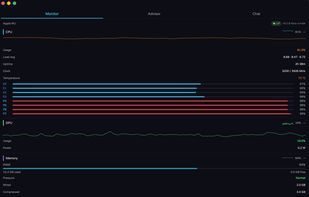
Lightweight macOS and Windows menu bar system monitor for Apple Silicon. Shows CPU, temperature, network, and benchmarks. Compiles from source on your Mac. No telemetry, no subscriptions.

Cost / License
- Free
- Open Source (MIT)
Application type
Platforms
- Mac
- Windows
- Linux

Features
MacBar News & Activities
Highlights All activities
Recent activities
 Danilo Venom added MacBar as alternative to Vitals for macOS
 Vitals added MacBar as alternative to Vitals Activity Monitor
- Ben liked MacBar
- Quite-Velocity added MacBar as alternative to Task Manager for macOS
- Paul added MacBar as alternative to ActivityLine
- pop-hub-com added MacBar as alternative to Sharp Lynx
- mzx l updated MacBar
Finally, a Mac monitor that doesn't spy on you I've tried half a dozen system monitors for macOS and rNitro is the first one that feels like it's actually built for the user, not for collecting data. The CLI has that satisfying btop-style TUI — real-time CPU stats without the bloat, without a background service phoning home, without a subscription paywall.
Setup was a one-liner curl install, checksums included so I could verify what I was running before I ran it. That alone puts it ahead of...
- dr-saturday liked MacBar
- mzx l updated MacBar


What is MacBar?
MacBar information
Developed by
 ilikemacos
 Licensing
Open Source (MIT) and Free product.Rating
Average rating of 5Alternatives
44 alternatives listedBadge
Get an embeddable badge for MacBarSupported Languages
AlternativeTo Categories
OS & Utilities, System & Hardware, Network & AdminGitHub repository
- 11 Stars
- 0 Forks
- 1 Open Issues
- Updated


Comments and Reviews
Finally, a Mac monitor that doesn't spy on you I've tried half a dozen system monitors for macOS and rNitro is the first one that feels like it's actually built for the user, not for collecting data. The CLI has that satisfying btop-style TUI — real-time CPU stats without the bloat, without a background service phoning home, without a subscription paywall.
Setup was a one-liner curl install, checksums included so I could verify what I was running before I ran it. That alone puts it ahead of most "free" utilities in this space.
If you want to actually see what your CPU is doing instead of guessing, this is it.
rnitro is a lightweight and easy-to-use system monitor that gives you all the essential stats without slowing down your mac. it's a great replacement for heavier monitoring apps if you want something fast, simple, and privacy-friendly.
i have not seen a better cpu monitoring software, very accurate and opensource
A thoughtful tool.
rNitro does exactly what it says: it tucks a clean system monitor into your menu bar and stays out of the way. What stands out is the care behind the choices — it's free, open source, no subscriptions.
The design is genuinely nice, too. The icon is sharp and the readout is easy to read at a glance. For a lightweight utility, it hits the right balance: useful information without clutter.
Worth a look if you want a no-nonsense way to keep an eye on your Mac.
i agree plenty very useful software
Excellent effort! Convenient All In One!