





FrameHeat
Like
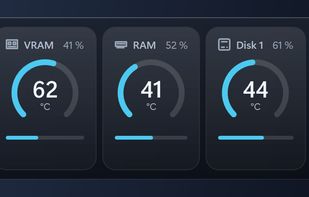
FPS counter and hardware monitor for Windows 11: CPU, GPU, VRAM, RAM and disk temperatures and load, plus the frame rate of your game, in a click-through overlay widget.

Cost / License
- Free
- Open Source (MIT)
Platforms
- Windows


Features
Highlights All activities
FrameHeat News & Activities
Recent activities
- Paula-Karhi updated FrameHeat
- Paula-Karhi added Works Offline as a feature to FrameHeat
- Paula-Karhi added System Information as a feature to FrameHeat
- Paula-Karhi added In-Game Overlay as a feature to FrameHeat
- Paula-Karhi added Performance Monitoring as a feature to FrameHeat
- Paula-Karhi added Privacy focused as a feature to FrameHeat
- Paula-Karhi added Gaming-focused as a feature to FrameHeat
- Paula-Karhi added No registration required as a feature to FrameHeat
Developed by
Paula KarhiLicensing
Open Source (MIT) and Free product.Written in
Alternatives
13 alternatives listedBadge
Get an embeddable badge for FrameHeatSupported Languages

AlternativeTo Categories
System & Hardware, OS & UtilitiesGitHub repository
- 0 Stars
- 0 Forks
- 0 Open Issues
- Updated


No comments or reviews, maybe you want to be first?