Apps with 'Markdown Export' feature Page 3 of 3

All apps in Apps with 'Markdown Export' feature category. Use the filters below to narrow down your search. 
Copy a direct link to this comment to your clipboard
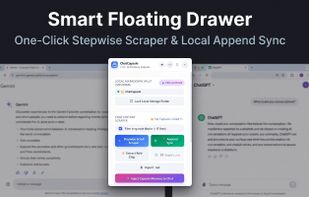
  1. ChatCapsule is a local-first Chrome extension designed to eliminate browser tab crashes, memory bloat, and context loss from long AI chats.

    Cost / License

    • Paid
    • Proprietary

    Since

    • New

    Platforms

    • Google Chrome
    • TW flagTaiwan
    Smart Floating Drawer: 1-click stepwise DOM scraping and local append sync without token loss.
    Targeted Topic Handoff: Extract memory role chips and switch context seamlessly across ChatGPT, Claude, and Gemini.
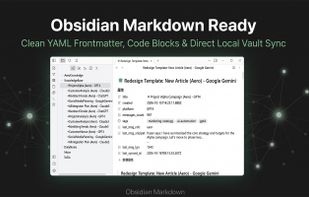
    Obsidian Markdown Ready: Clean YAML frontmatter, formatted code blocks, and direct local vault synchronization.
  2. Export your Apple Notes to any format with one click. Preserve attachments, formatting, and folder structure, and safely export your Apple Notes data to Markdown, PDF, and other formats for long-term keeping.

    Cost / License

    • Paid
    • Proprietary

    Since

    • Since 2025

    Platforms

    • Mac
    • US flagUnited States
    Apple Notes Exporter Pro screenshot 1
    Apple Notes Exporter Pro screenshot 1
    Apple Notes Exporter Pro screenshot 2
    2 alternatives
  3. Markdown Preview Editor is a free browser-based Markdown editor with live preview and synchronized scrolling.

    Cost / License

    • Free
    • Open Source (MIT)

    Since

    • New

    Platforms

    • Online
    • Self-Hosted
    • SE flagSweden
    • European Union flagEU
    Split view: Markdown editor with live preview
    Home page
    7 alternatives
  4. Hold My Notes keeps a deck of sticky notes on the right edge of your Mac. At rest it is a thin pill; move the pointer over and the notes fan out. Encrypted on your machine, no account, macOS 13 or later.

    Cost / License

    • Paid
    • Proprietary

    Application type

    Since

    • New

    Platforms

    • Mac
    • IN flagIndia
    Hold My Notes screenshot 1
    Hold My Notes screenshot 1
    Hold My Notes screenshot 2
    +2
    Hold My Notes screenshot 3
    50 alternatives
  5. Decant icon
     Like

    Privacy-first, open-source browser extension that turns web pages into clean Markdown locally, with Obsidian, Logseq, and Notion-friendly exports.

    Cost / License

    Since

    • New

    Platforms

    • Google Chrome
    • Mozilla Firefox
    • Microsoft Edge
    • US flagUnited States
    Decant screenshot 1
    Decant screenshot 1
    Decant screenshot 2
    14 alternatives
  6. Export complete or selected AI chats to PDF, Word, Markdown, JSON, TXT, or images, preserving code, formulas, tables, links, and images.

    Cost / License

    • Free
    • Proprietary

    Since

    • New

    Platforms

    • Online
    • Google Chrome
    • Mozilla Firefox
    • Microsoft Edge
    One-Click AI Chat Export
Export full AI Chats in one click to PDF, Word, Markdown, TXT or JSON.

Seamlessly works across 15+ AI platforms, including ChatGPT, Gemini, Claude, DeepSeek.
    Export Only What Matters
Handpick the most valuable insights from long chats. Keep your exports clean and noise-free.

Select specific chats
Filter out irrelevant noise
Perfect for long conversations
    Export Preview
Rich formatting is largely preserved—exported PDFs closely follow what you see in preview.

Switch light, dark, or sticky-note themes to match your style before saving.

- LaTeX formulas
- Code highlighting
- Timestamps
- Model name
- Long chats export
    +2
    Send AI Chats to Notion
Sync important AI chats directly into Notion Pages or Databases.

One-click seamless export
Preserves Markdown formatting
Auto-append to databases
    8 alternatives
  7. Walkthru icon
     Like

    Create step-by-step iPhone and iPad guides from recordings or screenshots, with gesture markers, redactions, captions, and local exports.

    Cost / License

    • Freemium
    • Proprietary

    Application type

    Since

    • New

    Platforms

    • iPhone
    • iPad
    • MM flagMyanmar (Burma)
    Walkthru screenshot 1
    Walkthru screenshot 1
    Walkthru screenshot 2
    +15
    Walkthru screenshot 3
    14 alternatives
  8. Durupin PDF Translator translates PDFs, documents, pictures, and SRT/VTT subtitles with AI running on your Windows PC. Translation and OCR are included, so you can translate offline without uploading documents.

    Cost / License

    • Paid
    • Proprietary

    Since

    • New

    Platforms

    • Windows
    Durupin PDF Translator screenshot 1
    Durupin PDF Translator screenshot 1
    Durupin PDF Translator screenshot 2
    +7
    Durupin PDF Translator screenshot 3
    6 alternatives
  9. Transform your ideas into professionally formatted eBooks with eBook Design Studio, the comprehensive solution for authors, bloggers, and digital publishers.

    Cost / License

    • Free
    • Proprietary

    Application type

    Since

    • Since 2026

    Platforms

    • Mac
    eBook Creator screenshot 1
    eBook Creator screenshot 1
    eBook Creator screenshot 2
    +1
    eBook Creator screenshot 3
    7 alternatives
  10. take·notes is a free, open-source tool that turns a YouTube video, web article, arXiv paper, or GitHub repo into a self-contained HTML study note — an executive summary, key points, and a timestamped or sectioned outline, written to your own disk.

    Cost / License

    • Free
    • Open Source (MIT)

    Since

    • New

    Platforms

    • Claude Code
    • Cursor
    • OpenAI Codex
    • OpenCode
    • Gemini CLI
    • ES flagSpain
    • European Union flagEU
    take·notes screenshot 1
    take·notes screenshot 1
    take·notes screenshot 2
    +1
    take·notes screenshot 3
    2 alternatives
  11. The Medium Article Writer Add-on for Google Docs helps authors to create content and publish to Medium directly from Google Docs.

    Team members can write, edit, and collaborate wherever they are and view the updates real time in Google Docs.

    Cost / License

    • Free
    • Proprietary

    Since

    • Since 2018

    Platforms

    • Chrome OS
    • Online
    • Google Drive
    • Google Drive - Docs
    Medium Article Writer screenshot 1
    20 alternatives
  12. MDash icon
     Like

    Write or paste Markdown — a ChatGPT answer, your notes, a whole thesis — and export a clean, print-ready PDF with smart page breaks and working links.

    Cost / License

    • Paid
    • Proprietary

    Since

    • New

    Platforms

    • Mac
    MDash screenshot 1
    MDash screenshot 1
    MDash screenshot 2
    +4
    MDash screenshot 3
    7 alternatives
  13. Markdown Writer is a free online Markdown editor for writing and previewing documents in the browser. It supports live preview, GitHub Flavored Markdown (GFM), KaTeX math, Mermaid diagrams, and PDF export.

    Cost / License

    • Free
    • Proprietary

    Since

    • New

    Platforms

    • UNIX Web Browser
    Markdown Writer editor with live preview and Markdown document workspace.
    25 alternatives
  14. Notes-Up icon
     Like

    An intuitive note-taking application that was made specifically for Elementary OS. Community builds are available for other Linux distributions, including Arch and openSUSE. The application's features include:

    Cost / License

    Application type

    Since

    • Since 2021

    Alerts

    • Discontinued

    Platforms

    • Linux
    • Arch Linux
    • openSUSE
    • elementary OS
    Notes-Up screenshot 1
    Notes-Up screenshot 1
    Notes-Up screenshot 2
    18 alternatives