

Mimik icon
Mimik icon

Mimik

Auto-capture any browser workflow into a step-by-step guide with screenshots. Local-first, open source, bring your own AI key.
Mimik screenshot 1

Cost / License

  • Free
  • Open Source (MIT)

Application type

Platforms

  • Microsoft Edge
  • Google Chrome
  • Mozilla Firefox
0likes
0comments
0articles

Features

Properties

  1.  Privacy focused

Features

  1.  No registration required
  2.  No Tracking
  3.  Ad-free
  4.  Annotate Screenshot
  5.  AI-Powered
  6.  Microsoft Edge extension
  7.  Export to HTML
  8.  Keylogger
  9.  Step-by-Step Guides
  10.  OpenAI Integration
  11. Claude icon  Claude Integration
  12.  Step by Step
  13.  Export to PDF

Mimik News & Activities

Highlights All activities

Recent activities

Mimik information

  • Developed by

    GB flagWespoint
  • Licensing

    Open Source (MIT) and Free product.
  • Written in

  • Alternatives

    51 alternatives listed
  • Supported Languages

    • English

AlternativeTo Categories

Web BrowsersAI Tools & ServicesDevelopment

GitHub repository

  •  17 Stars
  •  6 Forks
  •  2 Open Issues
  •   Updated  
View on GitHub
Mimik was added to AlternativeTo by Paul on and this page was last updated .
No comments or reviews, maybe you want to be first?

What is Mimik?

Auto-capture any browser workflow into a step-by-step guide with screenshots. Local-first, open source, bring your own AI key.

Mimik auto-captures any browser workflow into a step-by-step guide with annotated screenshots. Open source, 100% local, no account, no uploads.

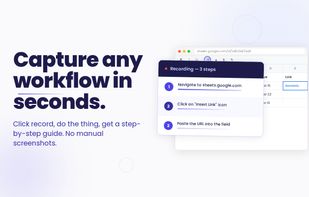
Click "Record," do the thing, and stop. Mimik captures each click and keystroke as a step. Each step has a screenshot, the element you clicked, and a description. Edit, replay, or export.

Features

  • Auto-capture clicks, typing, and navigation. No more writing steps by hand.
  • Annotated screenshots highlight what you clicked. No cropping, no arrow tools.
  • Optional AI step descriptions and titles (OpenAI or Anthropic)
  • Replay any guide on a live page. Use it for onboarding or step-by-step training.
  • Export to HTML, PDF, or Markdown. Files are self-contained, ready to share anywhere.
  • Smart Blur hides emails, phone numbers, and card data before sharing.

Private by design

  • 100% local. Mimik has no servers. Your guides, screenshots, and recordings never leave your browser.
  • No account, no sign-up, no tracking.
  • AI is optional. Turn it on with your own OpenAI or Anthropic key. Requests go from your browser straight to the provider, never to us. Without a key, Mimik still works.

Mimik Videos